Bluetooth Audio
Activating Bluetooth Audio Mode
- A Bluetooth Phone should be connected for Bluetooth audio mode.
- When the Bluetooth phone connection is cancelled during play, the music is terminated.
- Depending on the mobile phone, Bluetooth audio feature may not be supported.
- To play Bluetooth audio, connect the Bluetooth mobile phone to the vehicle's system.
Refer "Device connections settings" in User Manual for more details on the bluetooth connection.
- Press [MEDIA] button on the head unit. Or press [Media] on the home screen.
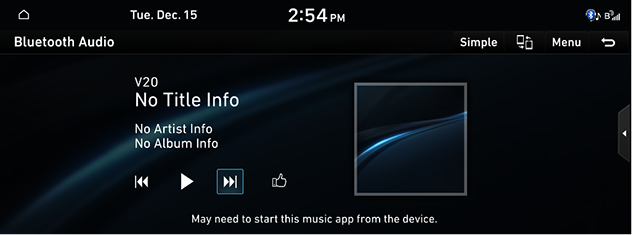
- Press [Bluetooth Audio]. Plays the last music previously played.
|
|
|
,Reference |
|


Pause/Play
|
Location |
Details |
|
Front screen |
|
|
Controller |
|
|
,Reference |
|
Depending on the mobile phone model, play/pause may not be supported. |
Play Previous/Next Music
Plays the previous/next file.
|
Location |
Details |
|
Front screen |
Touch [C/V]. |
|
Head unit |
Press [SEEK W/TRACK S] button. |
|
,Reference |
|
Depending on the mobile phone model, Play next/previous music may not be supported. |
Display album art on the Bluetooth audio screen
If Information of album, art cannot be received from the connected mobile phone, the album art is displayed through online search (Sound Hound).
At this time, the Information of album, art displayed on the mobile phone and the online search album, art may be different, and due to the time required for search, the start time of the song and the display time of the album, art may be different.
Simple Mode
Changes the screen view to simple mode.
Press [Simple] on the play screen.
|
,Reference |
|
To change back to the default screen, press [Normal] on the simple view screen. |
Change Device
You can connect the head unit and another Bluetooth device already paired.
- Press [Menu] > [Change Device] on the play screen.
- Press the desired Bluetooth device on the pop-up.
|
,Reference |
|
You can use the Change Device function by pressing [ |

Sound Settings
- Press [Menu] > [Sound Settings] on the play screen.
- Reference "Sound Settings" for features of sound settings.