Doors (if equipped)
You can configure the operation environment for the tailgate and doors.
- Available settings may differ depending on the vehicle model and specifications.
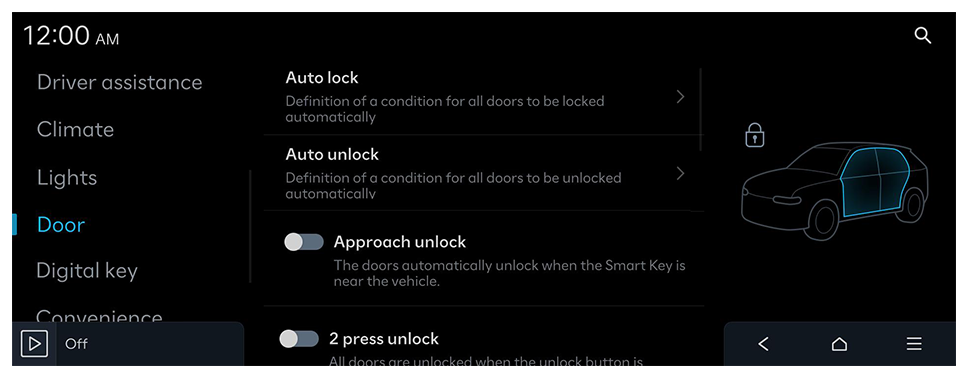
Auto lock
Definition of a condition for all doors to be locked automatically.
Auto unlock
Definition of a condition for all doors to be unlocked automatically.
Two press remote unlock
All doors are unlocked when the unlock button is pressed twice.
- When you press the door unlock button once, only the driver's seat door is unlocked.
Unlock on approach or touch
Select the doors to unlock when the driver approaches the vehicle with the Smart Key or digital key, or presses the door handle button.
Approach unlock
The doors automatically unlock when the Smart Key is near the vehicle.
Walk-away lock
The doors are automatically locked when moving away from the vehicle with the Smart Key or digital key. Caution! This only works when all doors are closed.
Two press unlock
All doors are unlocked when the unlock button is pressed twice. (Single press unlocks driver door only)
- When you press the door unlock button once, only the driver's seat door is unlocked.
Power Tailgate
The Power Tailgate button can be used to automatically open/close the tailgate.
Power Tailgate Opening Speed
Definition of the Power Tailgate opening and closing speed.
Power Tailgate Opening Height
The opening height of the Power Tailgate.
Smart Tailgate
The tailgate will be automatically opened when approaching the tailgate with the Smart Key.
Remote window control
Enable/disable the remote window control function.
Smart Sliding Door
Automatic opening of the sliding door when approaching the vehicle with the Smart Key.
Remote Power Doors & Tailgate
Option to open the power doors/ tailgate when the unlock button on the Smart Key is pressed for 3 seconds.
Tailgate auto close
Automatic closing of the tailgate when the Smart Key is no longer nearby.


 on the screen or press the [SEARCH] button on the control panel, enter a search term, and then select the item to run.
 ► Change menu display. The default mode is the image view.