Sharing the vehicle location
You can share the current location of the vehicle and the destination with others. You can select up to 15 recipients to share the location with by searching contacts on your mobile phone via Bluetooth or by manually entering the phone numbers.
- On the Home screen, press Location Sharing.
- Enter values for recipient and message.
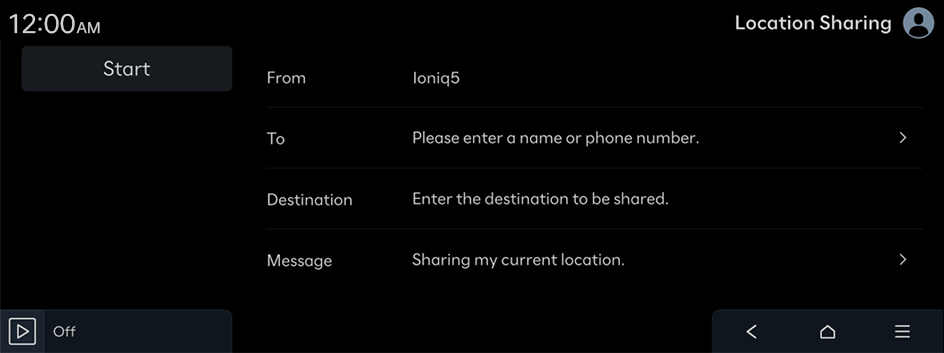
- To enter the phone number of the person receiving the vehicle location data, refer to the following: ▶ see "Phone number entry screen."
- Press Start.
The location sharing icon appears on the screen. A text message with the URL that gives access to the current location of the vehicle is sent to the recipient(s).
- When the destination is already set, the vehicle location is shared for the remaining time to arrival + 30 minutes. When the destination is not set, the recipient can see the vehicle location for 60 minutes.
- To use this service, you must consent to the provision of personal information to third parties.
- While the vehicle is turned off, the location cannot be shared. After the vehicle is turned on, the location sharing is enabled.
- The current location, remaining time, and remaining distance may not match actual values depending on the network connection status.
Phone number entry screen
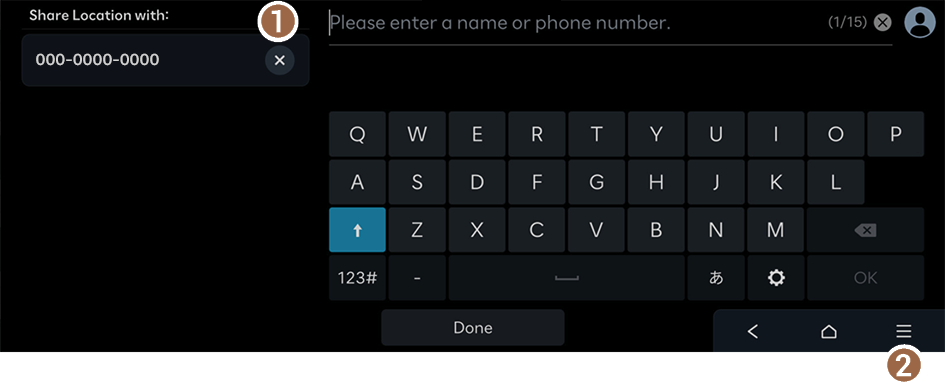
- Delete phone numbers from the list.
- Displays the list of menus.
- • Caller Info: See and change the caller infomation.
- • Edit Messages: Edit the message that is transmitted when you share your car location.
- • Online Manual: View the online manual by scanning the QR code with your mobile phone.
- You can add a maximum of 15 vehicle-location data recipients.
Location Sharing screen
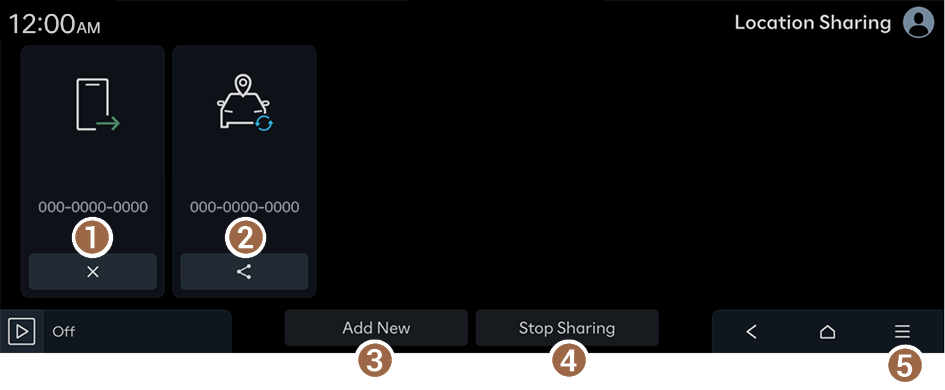
- Can cancel the vehicle location sharing.
- Can share the vehicle location again.
- Can share the vehicle location with recipients.
- Cancel the vehicle location sharing with the selected recipient(s).
- Displays the list of menus.
- • Caller Info: See and change the caller infomation.
- • Delete: Delete the selected items in the Location Sharing list that have been closed or canceled.
- • Edit Messages: Edit the message that is transmitted when you share your car location.
- • Online Manual: View the online manual by scanning the QR code with your mobile phone.
- You cannot change or delete the location information shared.
- You can save up to 10 location sharing information items. When the storage space is full, stored information items are automatically deleted from the oldest items.


