Using the navigation functions
You can use the navigation system conveniently through various functions on the Map screen.
Perform any of the following methods:
- • On the Home screen, press Map.
- • On the control panel, press the button.
Map
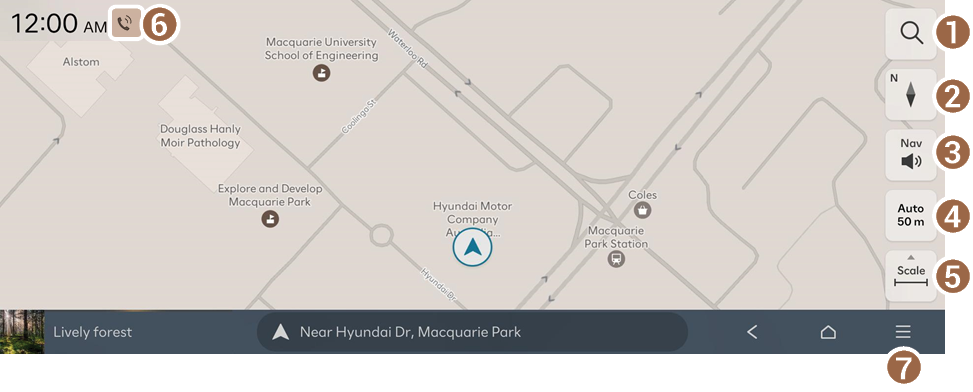
- Redirects to the Search screen.
- Change the map display mode.
- •
 (2D North up): Displays the map with the north fixed at the top.
 - •
 (2D heading up): Rotates the map depending on the driving direction.
 - •
 (3D heading up): Rotates the map depending on the driving direction for 3D view.
 - •
 (AR): Sets the display in augmented reality view (if equipped).
- •
- Adjust the navigation sound volume.
- To have the navigation sound always output first over media sound, enable Navigation prioritised.
- To turn off the voice navigation or sound effect, press
 and then press either
  or
or  .
.
- Set the map scale change mode to automatic or manual.
- Zooms in or out of the map.
- Displays the system information on the map.
- The system status information displayed on the screen may differ depending on the vehicle model and features.
- Displays the list of menus.
- • Traffic info: Hides or shows nearby traffic information on the map.
- • Recalculate: Resume routing based on the traffic information update.
- • EV range: Check the drivable range under the remaining battery percentage (EV only).
- • Route: Changes a route. ▶ See "Changing the route search option."
- • Nearby info: Set a destination by searching for nearby points of interest by category. ▶ See "Searching for nearby points of interest."
- • Traffic info: Displays notices and accident / construction-zone alerts on the map. ▶ See "Viewing traffic."
- • Save location: Register the current location or frequently visited places, and easily set any of these sites as a destination. ▶ See "Using saved favourite places."
- • Navigation settings: Displays the system navigation settings screen. ▶ See "Configuring the navigation settings."
- • Online manual: View the online manual by scanning the QR code with your mobile phone.


