Before using Connected Services (If equipped)
What is Connected Services?
Connected Services allow users to receive additional information in their car navigation system through the mobile phone network.
Traffic
Delivers the most accurate traffic information every two minutes. If you set the destination, you can have recommendation to recalculate the route according to the traffic condition.
Live charging stations / Live filling stations
Delivers charging/filling stations search results based on the real time location information.
Live parking
Provides parking information, and delivers parking information of the major European cities on the map.
Live POI (Point of Interest)
Delivers POI search results based on the real time location information.
Weather
Delivers weather information and forecast for five days, and delivers weather information of the major European cities on the map.
|
,Note |
|
Some functions are provided only in Wi-fi connection type, and Server Search is provided in Blue Link. |
Connecting phone for using Connected Services (If equipped)
- Activate a Wi-Fi Hotspot on your mobile phone, and search for Wi-Fi networks. (For details refer to your mobile phone's user manual.)
|
,Note |
|
By creating a Wi-Fi Hotspot, you may incur additional data charges depending on your data plan, particularly when roaming. The battery of the mobile phone may drain quickly so consider charging the phone while using Connected Services. |
- Press [SETUP] > [Data/Network].
- Press [Wi-Fi].
|
|
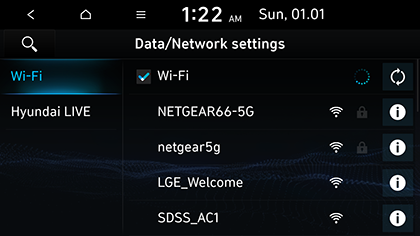
- Press [Wi-Fi]. Select the desired Network. (If you want to connect the Wi-Fi Network manually, press [Add Wi-Fi network]. Especially, you can connect a hidden Wi-Fi Network.)
|
,Note |
|
Traffic
The current traffic/road event information is basically displayed on the traffic information list. This feature may not be reflected depending on condition.
- Press [
 ] > [Hyundai LIVE] > [Traffic].
|
|
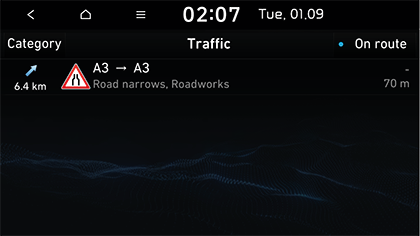
- It is displayed when there is traffic information along route or near current position.
- The total delay time will be displayed on title. This can be different from sum of each delay times due to rounding-off.
- Select the desired items.
|
|
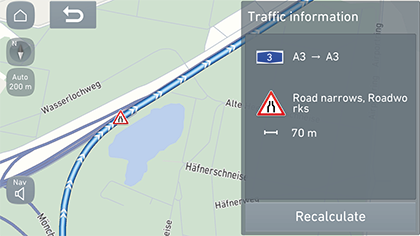
- [Recalculate]: Recalculates the route by reflecting traffic information.
Live POI (Point of Interest) (If equipped)
You can set a POI as destination using various search methods.
Searching for POI by [Near current position] or [Near destination]
- Press [
 ] > [Hyundai LIVE] > [Live POI].
|
|
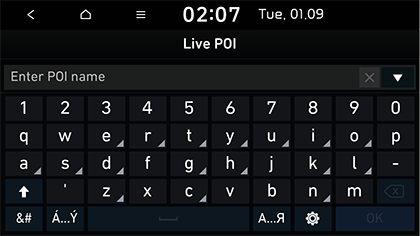
- Enter the desired POI (Point of Interest) name and press [OK].
- Press [Near current position] or [Near destination].
- [Near current position]: Searches POI near current vehicle position.
- [Near destination]: Searches POI near selected destination.
- Select the desired destination.
- Follow step 3 of the “Search” part.
Searching for POI by [Near scroll mark]
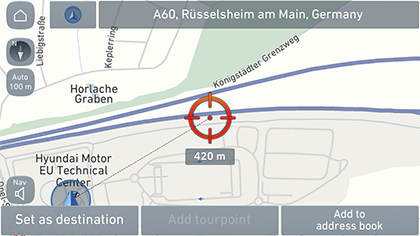
- Perform a long press on the desired map area. The selected point will be centred on the screen and the scroll mark will be displayed.
|
|
- Press [
 ] > [Hyundai LIVE] > [Live POI].
 - Enter the desired POI (Point of Interest) name and press [OK].
- Press [Near scroll mark]: Searches POI near scroll mark position.
- Select the desired destination.
- Follow step 3 of the “Search” part.
Searching for POI by [Near city centre]
- Press [
 ] > [Hyundai LIVE] > [Live POI].
|
|
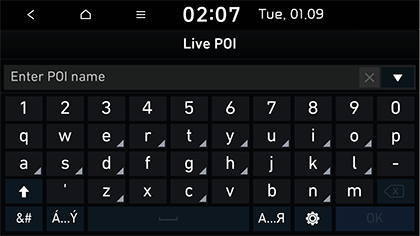
- Enter the desired POI (Point of Interest) name and press [OK].
- Press [Near city centre].
- Enter the desired city name and press [OK].
- Select the desired destination.
- Follow step 3 of the “Search” part.
Weather (If equipped)
This provides weather forecast for the next days including the current day, for the current position and destination.
- Press [
 ] > [Hyundai LIVE] > [Weather] > [Current position] or [Destination].
|
|
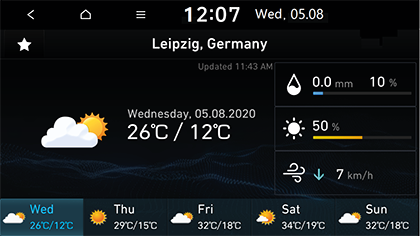
- [Current position]: Displays weather information in your current position.
- [Destination]: Displays weather information in your destination.
- Press the desired list for more weather information.
Setting Favourites
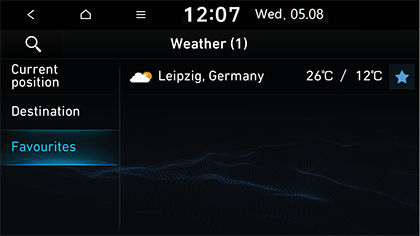
If your favourite locations have already been saved in the [Favourites] menu, you can check weather information for favourite locations easily.
Press [ ] > [Hyundai LIVE] > [Weather] > [Favourites].
|
|
|
,Note |
|
You can also add the current position or destination as favourites. Press [ |


Deleting Favourites
- Press [
 ] > [Hyundai LIVE] > [Weather] > [Favourites] > [Menu] > [Delete].
|
|
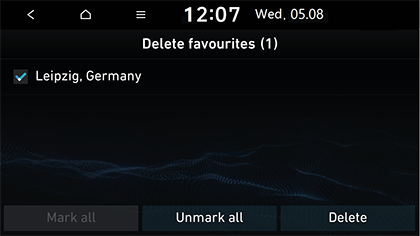
- Select the desired item, then press [Delete].
- [Mark all]: Marks all items.
- [Unmark all]: Unmarks all items.
|
,Note |
|
You can also delete the favourites in [Favourites] menu. Press [ |


Live parking
You can set a parking as destination using different search methods. You can set the advanced search option setting by pressing [Type].
This provides parking information, and delivers parking information of the major European cities on the map.
Searching for parking by [Near current position] or [Near destination]
- Press [
 ] > [Hyundai LIVE] > [Live parking].
|
|
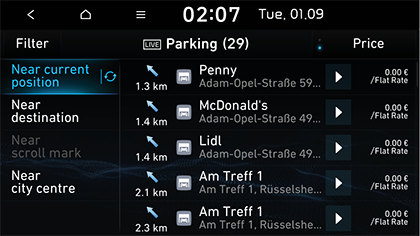
- Press [Near current position] or [Near destination].
- [Near current position]: Searches parking near current vehicle position.
- [Near destination]: Searches parking near selected destination.
- Select the desired destination.
- Follow step 3 of the “Search” part.
Searching for parking by [Near scroll mark]
- Perform a long press on the desired map area. The selected point will be centred on the screen and the scroll mark will be displayed.
|
|
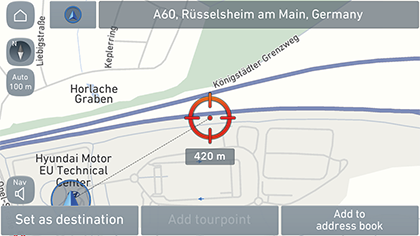
- Press [
 ] > [Hyundai LIVE] > [Live parking] > [Near scroll mark].
 - Select the desired destination.
- Follow step 3 of the “Search” part.
Searching for parking by [Near city centre]
- Press [
 ] > [Hyundai LIVE] > [Live parking] > [Near city centre].
|
|
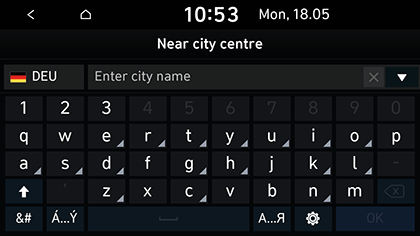
- Enter the desired city name and press [OK].
- Select the desired destination.
- Follow step 3 of the “Search” part.
Live charging stations (Live filling stations)
You can set a charging station (filling station) as destination using different search methods.
Searching for charging stations (filling stations) by [Near current position] or [Near destination]
- Press [
 ] > [Hyundai LIVE] > [Live charging stations] or [Live filling stations].
 - Press [Near current position] or [Near destination].
- [Near current position]: Searches charging stations (filling stations) near current vehicle position.
- [Near destination]: Searches charging stations (filling stations) near selected destination.
- Select the desired destination.
- Follow step 3 of the “Search” part.
Searching for charging stations (filling stations) by [Near scroll mark]
- Perform a long press on the desired map area. The selected point will be centred on the screen and the scroll mark will be displayed.
|
|
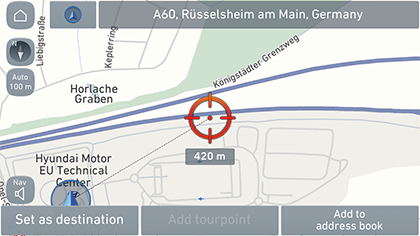
- Press [
 ] > [Hyundai LIVE] > [Live charging stations] or [Live filling stations] > [Near scroll mark].
 - Select the desired destination.
- Follow step 3 of the “Search” part.
Searching for charging stations (filling stations) by [Near city centre]
- Press [
 ] > [Hyundai LIVE] > [Live charging stations] or [Live filling stations] > [Near city centre].
|
|
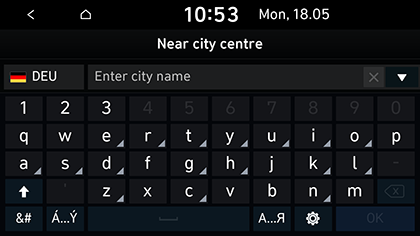
- Enter the desired city name and press [OK].
- Select the desired destination.
- Follow step 3 of the “Search” part.
Connected Services availability by Country
“O” : Available, “X” : Not Available, “△” : Optional
|
Country |
Code |
CSO Traffic |
CSO Weather |
CSO Camera |
CSO Server Search |
|
Albania |
ALB |
X |
O |
X |
△ |
|
Andorra |
AND |
O |
O |
O |
O |
|
Austria |
AUT |
O |
O |
O |
O |
|
Belgium |
BEL |
O |
O |
O |
O |
|
Bulgaria |
BGR |
X |
O |
O |
O |
|
Bosnia and Herzegovina |
BIH |
X |
O |
△ |
△ |
|
Belarus |
BLR |
X |
O |
△ |
△ |
|
Switzerland |
CHE |
O |
O |
X |
O |
|
Cyprus |
CYP |
X |
O |
△ |
O |
|
Czech |
CZE |
O |
O |
O |
O |
|
Germany |
DEU |
O |
O |
O |
O |
|
Denmark |
DNK |
O |
O |
O |
O |
|
Spain |
ESP |
O |
O |
O |
O |
|
Estonia |
EST |
O |
O |
O |
O |
|
Finland |
FIN |
O |
O |
O |
O |
|
France |
FRA |
O |
O |
O |
O |
|
UK |
GBR |
O |
O |
O |
O |
|
Gibraltar |
GIB |
O |
O |
△ |
O |
|
Greece |
GRC |
O |
O |
O |
△ |
|
Croatia |
HRV |
O |
O |
O |
O |
|
Hungary |
HUN |
O |
O |
O |
O |
|
Ireland |
IRL |
O |
O |
△ |
O |
|
Iceland |
ISL |
O |
O |
△ |
O |
|
Italy |
ITA |
O |
O |
O |
O |
|
Liechtenstein |
LIE |
O |
O |
X |
O |
|
Lithuania |
LTU |
O |
O |
O |
O |
|
Luxemburg |
LUX |
O |
O |
O |
O |
|
Latvia |
LVA |
O |
O |
O |
O |
|
Monaco |
MCO |
O |
O |
O |
O |
|
Moldova |
MDA |
X |
O |
X |
△ |
|
Macedonia |
MKD |
X |
O |
X |
△ |
|
Malta |
MLT |
X |
O |
△ |
O |
|
Montenegro |
MNE |
X |
O |
X |
O |
|
Netherlands |
NLD |
O |
O |
O |
O |
|
Norway |
NOR |
O |
O |
O |
O |
|
Poland |
POL |
O |
O |
O |
O |
|
Portugal |
PRT |
O |
O |
O |
O |
|
Romania |
ROU |
O |
O |
O |
O |
|
Russia |
RUS |
O |
O |
O |
O |
|
San marino |
SMR |
O |
O |
△ |
O |
|
Serbia |
SRB |
X |
O |
O |
O |
|
Slovakia |
SVK |
O |
O |
O |
O |
|
Slovenia |
SVN |
O |
O |
O |
O |
|
Sweden |
SWE |
O |
O |
O |
O |
|
Turkey |
TUR |
O |
O |
X |
O |
|
Ukraine |
UKR |
O |
O |
O |
O |
|
Vatican City |
VAT |
X |
O |
O |
O |
|
Country |
Code |
CSO Parking |
CSO Parking |
CSO Fuel |
CSO EV |
CSO FCEV |
|
Albania |
ALB |
O |
△ |
X |
△ |
X |
|
Andorra |
AND |
O |
△ |
O |
O |
X |
|
Austria |
AUT |
O |
△ |
O |
O |
O |
|
Belgium |
BEL |
O |
O |
O |
O |
O |
|
Bulgaria |
BGR |
O |
△ |
O |
O |
X |
|
Bosnia and Herzegovina |
BIH |
O |
△ |
△ |
△ |
X |
|
Belarus |
BLR |
△ |
△ |
X |
X |
X |
|
Switzerland |
CHE |
O |
O |
O |
O |
O |
|
Cyprus |
CYP |
O |
X |
O |
X |
X |
|
Czech |
CZE |
O |
O |
O |
O |
△ |
|
Germany |
DEU |
O |
O |
O |
O |
O |
|
Denmark |
DNK |
O |
O |
O |
O |
O |
|
Spain |
ESP |
O |
O |
O |
O |
O |
|
Estonia |
EST |
O |
△ |
△ |
O |
△ |
|
Finland |
FIN |
O |
O |
O |
O |
△ |
|
France |
FRA |
O |
O |
O |
O |
O |
|
UK |
GBR |
O |
O |
O |
O |
O |
|
Gibraltar |
GIB |
O |
X |
X |
X |
X |
|
Greece |
GRC |
O |
△ |
O |
O |
X |
|
Croatia |
HRV |
O |
△ |
O |
O |
X |
|
Hungary |
HUN |
O |
△ |
O |
O |
X |
|
Ireland |
IRL |
O |
O |
O |
O |
X |
|
Iceland |
ISL |
O |
△ |
X |
O |
△ |
|
Italy |
ITA |
O |
O |
O |
O |
O |
|
Liechtenstein |
LIE |
O |
X |
O |
△ |
X |
|
Lithuania |
LTU |
O |
△ |
△ |
O |
X |
|
Luxemburg |
LUX |
O |
O |
O |
O |
X |
|
Latvia |
LVA |
O |
△ |
△ |
O |
△ |
|
Monaco |
MCO |
O |
X |
O |
△ |
X |
|
Moldova |
MDA |
O |
△ |
X |
X |
X |
|
Macedonia |
MKD |
O |
△ |
△ |
△ |
X |
|
Malta |
MLT |
O |
△ |
X |
O |
X |
|
Montenegro |
MNE |
O |
△ |
X |
X |
X |
|
Netherlands |
NLD |
O |
O |
O |
O |
O |
|
Norway |
NOR |
O |
O |
O |
O |
O |
|
Poland |
POL |
O |
O |
O |
O |
X |
|
Portugal |
PRT |
O |
O |
O |
O |
X |
|
Romania |
ROU |
O |
△ |
O |
O |
X |
|
Russia |
RUS |
O |
O |
O |
O |
X |
|
San marino |
SMR |
O |
△ |
O |
△ |
X |
|
Serbia |
SRB |
O |
△ |
△ |
O |
X |
|
Slovakia |
SVK |
O |
△ |
O |
O |
X |
|
Slovenia |
SVN |
O |
△ |
O |
O |
X |
|
Sweden |
SWE |
O |
O |
O |
O |
O |
|
Turkey |
TUR |
O |
△ |
O |
O |
X |
|
Ukraine |
UKR |
O |
△ |
△ |
△ |
X |
|
Vatican City |
VAT |
X |
X |
X |
X |
X |
|
,Note |
|