Turning on the radio
You can scan radio channels by using various options. Save your favourite channels to the presets list.
Perform any of the following methods:
- • On the All menus screen, press Radio.
- • On the control panel, press the button (if equipped).
- When multiple media are connected, press the or button once more and then press the desired media source from the Radio/Media selection window (if equipped).

Type1
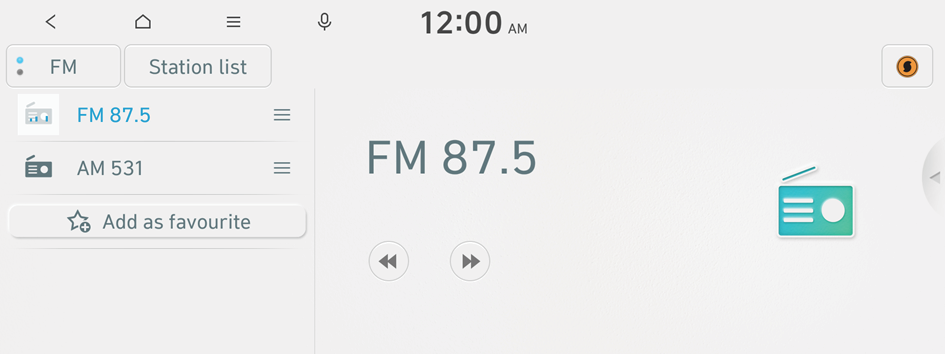
Type2
- The screen may differ depending on the vehicle model and specifications.
- If the vehicle is type 2, it is possible to change the graphic theme to white or black. ▶ See "Graphic themes (EV only)."
Radio screen
The radio screen provides various functions while listening to radio broadcasts.

- Can change the radio mode.
- Can see the list of available radio stations.
- Presets list
- Press and drag
 the icon to rearrange the presets list.
- Press and drag
- You can delete or save the current frequency to the presets list. ▶ See "Saving radio channels."
- Radio broadcast information
- Can change the broadcasting frequency.
- Shows information about the radio channel you are currently tuned in to (if info available).
- Use Soundhound to display the detailed information of the music that is now playing on the radio.
- To use the Soundhound service, subscribe to the Bluelink service. ▶ See "Subscribing to the service."
- Can turn on or off the split screen mode.
- You can change radio channels by using voice commands. ▶ See "Changing the channel by using voice commands."
- The list of menu items appears.
- • Display Off: Turns off the screen. To switch the screen back on, press anywhere on the screen or briefly press the power button.
- • Station list: Can see the list of available radio stations.
- • Scan FM (Available only with FM): Select a broadcast of your choice after listening briefly to broadcasts from different radio stations.
- • Scan AM (Available only with AM): Select a broadcast of your choice after listening briefly to broadcasts from different radio stations.
- • Manual tune FM (Available only with FM): Tune the radio frequency manually.
- • Manual tune AM (Available only with AM): Tune the radio frequency manually.
- • Delete favourites: Can delete a registered channel from the presets list. ▶ See "Deleting a registered channel."
- • Reorder favourites: Rearrange the presets list.
- • Soundhound history: Can see recently searched music files through the Soundhound service.
- • Info: Turns the Radio text information transmitted from the broadcasting station on and off (if equipped).
- • Radio noise control: Customise sound quality when listening to radio by adjusting background noise of the original sound (Available only with FM).
- • Sound settings: Displays the system sound settings screen.
- • Manual: Displays the QR code that provides access to the online user manual for the system.
- • Split screen: Can turn on or off the split screen mode.
- The sound effect settings button may appear on the screen depending on the amp specifications.
- Press
 to add the music currently playing on the radio to Favourites (if equipped).
- The icon is displayed on the radio screen only when you are subscribed to the Bluelink service.
- The icon is displayed on the radio screen only when the title and artist information of the music playing on the radio has been received by running a music search service.
- You can find the Liked songs in Soundhound history.
- The screen may differ depending on the vehicle model and specifications.
- If the vehicle is type 2, it is possible to change the graphic theme to white or black. ▶ See "Graphic themes (EV only)."
Changing the radio mode
Perform any of the following methods:
- • On the Radio screen, press FM/AM button repeatedly.
- • On the control panel, press the button repeatedly (if equipped).
The radio mode changes in the order of FM ▶ AM.
Changing the radio channel
Perform any of the following methods:
- • On the Radio screen, press the desired channel from the presets list.
- You can also change the channel by using the Move lever on the steering wheel.
- • On the control panel, press the
 or
or  button. You can move to the previous or next channel with good reception (if equipped).
 - • Can change the frequency. Shortly press to switch to the previous/next frequency, or press and hold to quickly change the frequency. When you release the
 or
or  button, the previous or next channel with good reception is automatically selected.
You can listen to the changed radio broadcast.
- If any Search knob on the control panel, you can also change the frequency by using the knob.
Changing the channel by using voice commands
You can change the radio channel by using voice commands.
- On the Radio screen, press
 .
. - When a guiding beep is heard, say the desired radio frequency channel.
Using the scan function
You can listen to each broadcast briefly and select a desired one.
- On the Radio screen, press
 ▶ Scan FM/Scan AM.
Only the channels with good reception can be listened for 5 seconds in turn.
- When you find the desired broadcast, press the radio screen.
You can continue listening to the scanned channel.
Saving radio channels
You can save a specific radio station's channel and easily access the channel.
While listening to a broadcast, press  on the screen.
The current channel is added to the presets list.
- Alternatively, on the Radio screen, select ▶ Station list and press
 of the channel you want to save. The channel is saved to the preset list.
 - You can register up to 24 channels.
Editing the radio channel list
Deleting a registered channel
- At the upper left of the Radio screen, press ▶ Delete favourites.
- Select the channel to delete and press Delete ▶ Yes.
The channel is deleted and the preset list is emptied.
Rearranging the list of saved channels
- At the upper left of the Radio screen, press ▶ Reorder favourites.
- Press and drag next the channel to rearrange to the desired position.
The presets list is rearranged.


