Playing iPod
Playing iPod
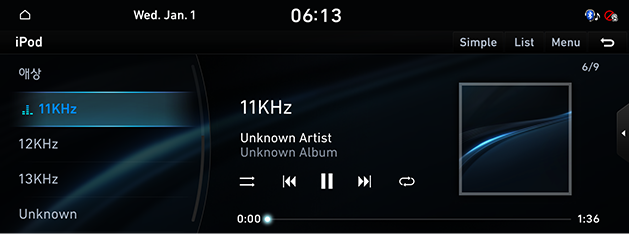
Connect iPod to USB connection terminal using iPod connection cable.
|
|
|
,Reference |
|
To play the connected iPod while other media is playing, press the [MEDIA] button on the head unit. Press [iPod] on the screen. |
Pause/Play
Pause/Play the current music.
|
Location |
Details |
|
Front screen |
|
|
Controller |
|
Play Previous/Next Music
Plays the previous/next file.
|
Location |
Details |
|
Front screen |
Touch [C/V]. |
|
Head unit |
Press [SEEK W/TRACK S] button. |
Forward/Reverse Search
Rapidly searches the current music in play.
|
Location |
Details |
|
Front screen |
After touching on [C/V] for a long time and release the finger at the desired spot, the music starts from that spot. |
|
Head unit |
After pressing and holding [SEEK W/TRACK S] button and releasing the button at the desired spot, the music starts from that spot. |
Search Previous/Next Music
Searches the previous/next music.
During searching, the music name is highlighted in blue color. When the desired file name is displayed, press [TUNE/FILE] button and controller to play the file.
|
Location |
Details |
|
Head unit |
Rotate [TUNE/FILE] button to left/right. And when the desired music is displayed press the button |
|
Controller |
Rotate controller to left/right. And when the desired music is displayed press controller. |
Viewing List
May play a desired music by searching the list.
Playing Music by searching list
- Press [List] on the play screen. Or press [Menu] > [List].
- On the list screen, search for the desired music by category (playlists, artists, albums, songs, moer, etc.).
|
,Reference |
|
Press [ |

Reorder Categories
- Press [Menu] > [Reorder Categories] on the list screen.
- Press and hold a category to edit the sequence up/down.
Shuffle
Play the entire music randomly.
- Press [Menu] > [Shuffle] on the play screen.
- To cancel the shuffle play, press [Shuffle] again.
|
,Reference |
|
Selecting [q]/[r] on the front screen activates/clears shuffle play. |
Repeat
The music plays repeatedly.
- Press [Menu] > [Repeat] on the play screen.
- Press a desired repeat mode.
- [k]: Repeats the entire music.
- [n]: Repeats the music currently in play.
- [o]: Clears the repeat.
|
,Reference |
|
Selecting [k/n/o] on the play screen also activates/clears repeat. |
Simple Mode
Changes the screen view to simple mode.
Press [Simple] on the play screen.
|
,Reference |
|
To change back to the default screen, press [Normal] on the simple view screen. |
Sound Settings
- Press [Menu] > [Sound Settings] on the play screen.
- Reference "Sound Settings" for features of sound settings.