Paying at Starbucks (if equipped)
Pay at Starbucks with the card registered in In-Car Payment.
- You can order anything you want (with the exception of reserve or specialty drinks) at any Starbucks store. (Some stores that use reusable cups are excluded.)
- To find and set a store close to the vehicle as the destination, press In-car Payment from the Home screen.
- On the Home screen, press In-car Payment.
- Move to the In-car Payment screen, using either of the following methods.
- • Check Starbucks store where you can use In-Car Payment, and press Order to access the menu screen.
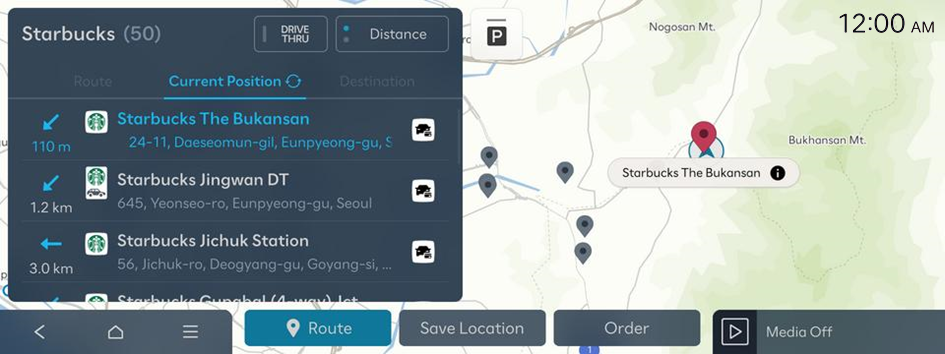
- To sort a list of search results in a different order, press the sort criteria and change to the option you want.
- • Select a nearby Starbucks store from the map screen, and press
 to access the menu screen.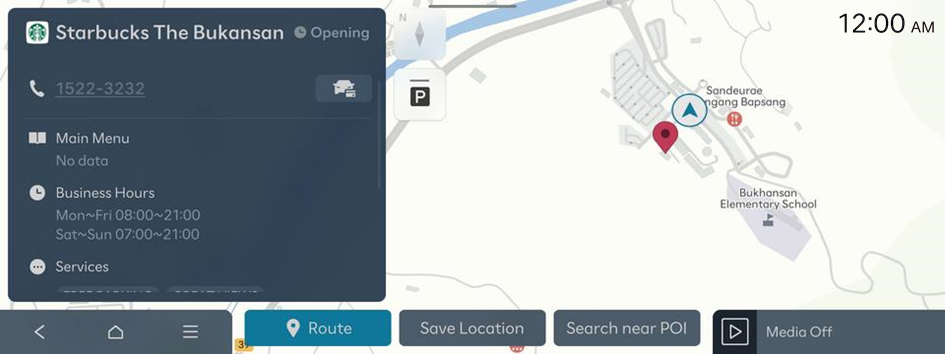
- Starbucks store information shown on the map screen may not match the actual information.
- If you turn on the POI display mode, In-car Payment affiliates are displayed on the map.
- • Check Starbucks store where you can use In-Car Payment, and press Order to access the menu screen.
- Select your choice, a payment card, and order Order Type, and then press Pay.
- Up to 20 orders recently made using In-Car Payment are displayed.
- The recommended or full menu displays all food and beverage options currently available at Starbucks, regardless of which store is selected.
- When you access the shopping cart screen, payment is processed after checking whether or not it is possible to order from the selected store.
- Enter your payment password to complete the payment.
- If you have entered your payment password incorrectly five times in succession, in the myHyundai App, press 마이 ▶ 월렛 and change the payment password.
- Collect your order using the selected order type.
- • If you selected Drive-thru
Collect your order from the drive-thru pickup counter.
- • If you selected Pickup in store
Visit the store you ordered from, and collect your order.
- • If you selected Drive-thru


