Using N mode (if equipped)
Set the vehicle system for high-performance driving.
On the Home screen, press N Mode.
N Mode screen
The N Mode screen provides the following features and information:
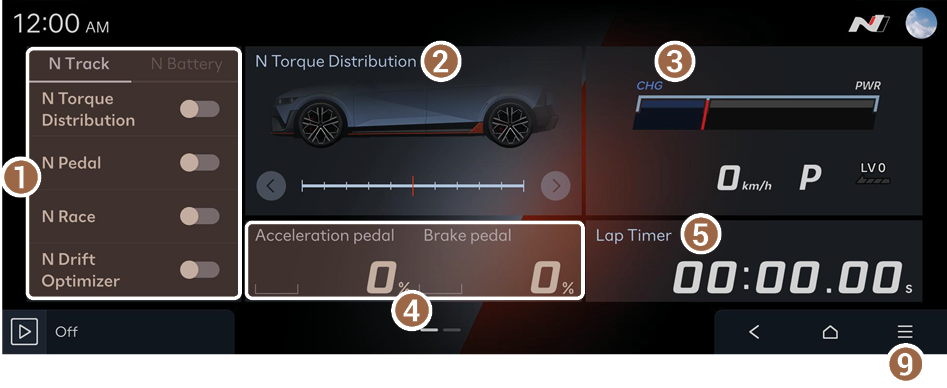
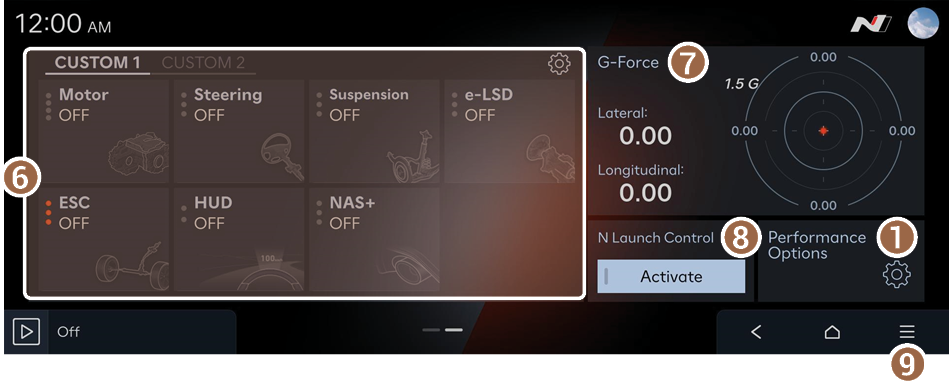
- Can select the vehicle's performance options.
- Provides N Torque Distribution information.
- Provides the vehicle's RPM information.
- Displays the acceleration pedal and Brake press in real time.
- Recorded lap results will be displayed.
- Can select the drive mode for each feature.
- Displays the gravitational force generated during a turn in real time.
- Helps to accelerate rapidly from a standing start.
- Displays the list of menus.
- • Edit N Mode Widgets: Can configure the performance info widget to show on the N mode screen.
- • Performance Options: Can select the vehicle's performance options.
- • Tutorial: Can view the tutorials on N mode driving such as Track Driving and Economy.
- • Online Manual: View the owner's manual by scanning the QR code with your mobile phone.
Configuring the drive mode
You can configure individual settings including the motor and suspension for each drive mode.
- On the N Mode screen, press
 in CUSTOM Mode widget.
 - Set up individual settings for each drive mode.
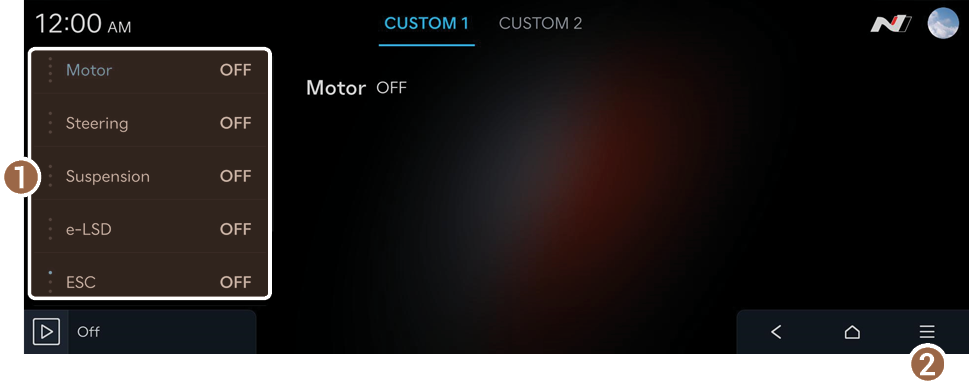
- Can select the drive mode for each feature.
- • Motor: Provides customizable settings to be used to set the Motor mode.
- • Steering: Provides options which set the steering effort/sensitivity.
- • Suspension: Selects the suspension mode.
- • e-LSD: Selects the Elec. Limited Slip Differential (e-LSD) mode.
- • ESC: Selects the Electronic Stability Control (ESC) mode.
- • HUD: Selects what information to provide according to the drive mode.
- • NAS+: Provides high-performance vehicle sound.
- Displays the list of menus.
- • Online Manual: View the owner's manual by scanning the QR code with your mobile phone.
- Can select the drive mode for each feature.
Managing driving records
You can check the lap time records and measure the acceleration performance.
Checking a lap time records
You can view lap time records including the history and the best time.
On the N Mode screen, press Lap Timer ▶ Lap.
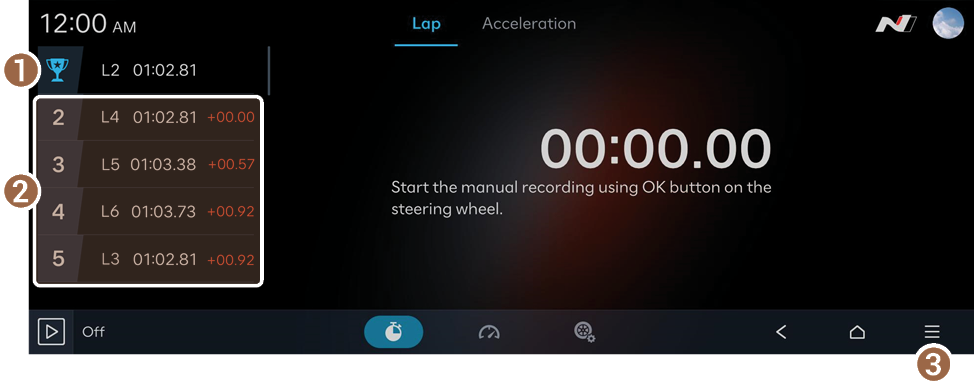
- Displays the best lap time.
- Displays the last lap time.
- Displays the list of menus.
- • Lap List: Displays the previous records in detail.
- A maximum of ten lap records can be saved in the lap list.
- • Time Gap: Can set the base record to show the time gap from the best or last lap.
- • Online Manual: View the owner's manual by scanning the QR code with your mobile phone.
- • Lap List: Displays the previous records in detail.
Measuring acceleration time
You can measure how long the vehicle takes to reach the target speed from a stop.
On the N Mode screen, press Lap Timer ▶ Acceleration.

Caution
- • You must be in an environment where you can drive and measure the time safely.
- • If you are on a public road, make sure you are following all relevant traffic regulations.
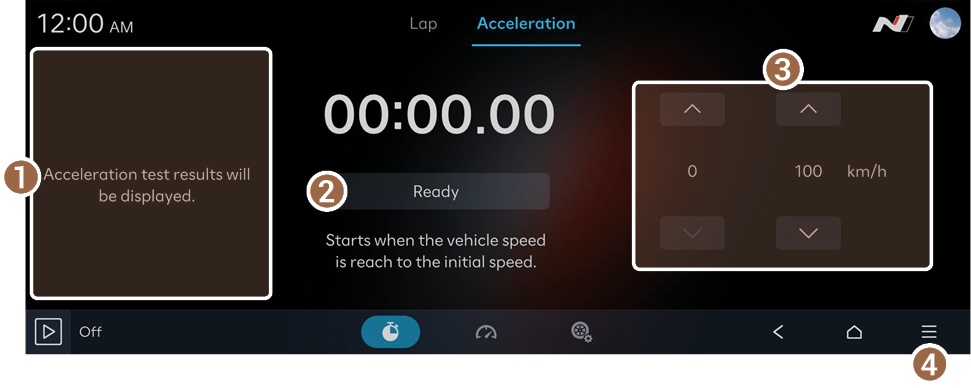
- Shows the measurement.
- Can start or cancel the measurement. Press the button and depress the accelerator to start.
- Can set the start and target speeds.
- Displays the list of menus.
- • Acceleration List: Displays the previous records in detail.
- A maximum of ten test results can be saved in the acceleration test list.
- • Online Manual: View the owner's manual by scanning the QR code with your mobile phone.
- • Acceleration List: Displays the previous records in detail.
Viewing driving performance information
You can view real-time information on your vehicle's driving performance.
On the N Mode screen, select an item you want to view.
Detailed performance information will be provided.
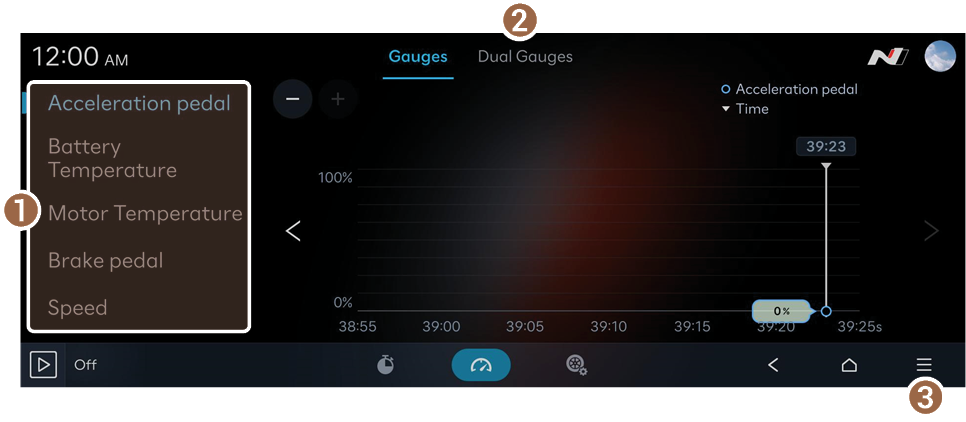
- Change the type of gauges displayed on the screen.
- • Acceleration pedal: Displays the acceleration pedal in real time.
- • Battery Temperature: Displays the battery temperature in real time.
- • Motor Temperature: Displays the motor temperature in real time.
- • Brake pedal: Displays the brake press in real time.
- • Speed: Displays the vehicle speed in real time.
- • Torque: Displays the torque in real time.
- Set the number of gauges displayed on the screen.
- Displays the list of menus.
- • Reset: Delete all records.
- • Online Manual: View the owner's manual by scanning the QR code with your mobile phone.
Setting performance options
- On the N Mode screen, press Performance Options.
- Select the performance option menu you want to set.
Caution
- • It is recommended that only experienced drivers use it in safe places other than public roads.
- • The responsibility for accidents caused by the driver's negligence rests with the driver himself.

- Can select the vehicle's performance options.
- • N Launch Control: Helps to accelerate rapidly from a standing start. Set appropriate road grip level for current road condition. Upper level tends to create higher target wheel slip which is suitable for high-grip road surface.
- • N e-Shift: Enhances fun and joy of driving engine & transmission equipped vehicles by simulating feel and sound of internal combustion vehicle's movement. N e-Shift is not activated in ECO mode.
- • N Active Sound+: Select your preferred N Active Sound+ setting.
- To turn off the N Active Sound+, press Off.
- • N Battery Preconditioning: Optimizes the battery temperature in advance for the driving purpose. This may cause noises, vibrations, air conditioning performance degradation, and shortened driving distance.
- • N Pedal: 3 level of coast regen are selectable and provide agile weight transfer and tuck-in behavior by fast and linear deceleration when throttle lift off. Pay attention to safety by sensitizing the vehicle's responsiveness to the accelerator pedal operation during limit driving.
- • N Drift Optimizer: Drift optimizer is running in rear-wheel driven condition. Minimized ESC intervention for allowing oversteer can result in spin-out depending on the driver's actions.
- • N Race: For track driving, the motor and battery are cooled to the maximum, which can cause noise. Frequent use of N Race can weaken battery durability.
- • N Torque Distribution: You can select the front and rear torque distribution ratio through the slider in the N Torque Distribution widget. Before driving, please ensure that the slider is set according to driver's preference. Actual distribution ratio may differ from the selected value momentarily depending on the driving conditions.
- Displays the list of menus.
- • Online Manual: View the owner's manual by scanning the QR code with your mobile phone.


