Sound
This menu is used to adjust the sound effects for the whole system. (It may vary depending on the type of vehicle.)
- Press [SETUP] > [Sound].
|
|
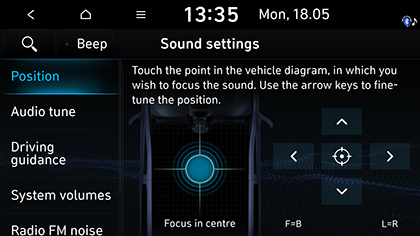
- Select the desired items.
- [Position (If equipped)]: This menu allows you to set the sound position. For example, you can set the sound close to the driver-seat so that the volume is relatively lower in the passenger or rear seats.
- Press [W/S/A/D] to control the sound position.
- Drag and drop the dot to a desired place to adjust the sound position.
- Press [j] to concentrate the sound in the centre of the vehicle.
- [Audio tune]: Sets the audio tune by adjusting [Treble], [Mid], [Bass], [Fader], or [Balance]. Press [-], [+], [F], [R], [L] or [R], or dragging the slide bar to control each items. Press [Centre] to initialize the settings.
- [Driving guidance]: Sets the navigation guide audio.
- [Reverse warning priority]: Lowers the audio volume when the shift lever is set to reverse.
- [Navigation during phone calls]: Sets playback of route guidance prompts during phone call.
- [Navigation prioritised]: Lowers all other audio volumes during playback of navigation prompts.
- [Mute navigation guidance]: Sets the guide to be muted for 10 seconds by pressing the mute button on the steering wheel while navigation prompts are playing.
- [System volumes]: Sets the system volumes.
- [Subsystem volumes] : Adjusts system volumes by pressing [-] or [+], or dragging the slide bar. Press [Default] to initialize the settings.
- [Connected device volumes] : Adjusts system volumes of [Android Auto] and [Apple CarPlay] by pressing [-] or [+], or dragging the slide bar. Press [Default] to initialize the settings.
- [Speed dependent volume control]: Sets the audio volume to be adjusted automatically according to vehicle speed. You can select [Off], [Low], [Medium] or [High].
- [Volume limitation on start-up]: Lowers automatically the audio volumes when starting the system.
- [Radio FM noise cancellation]: Selects the noise cancelling option.
- [Original sound]: Offers unaltered sound without reduction of background noise.
- [Mild noise reduction]: Offers a sound with reduced background noise, but still true to the original sound.
- [Strong noise reduction]: Offers a sound with maximized background noise reduction that impacts on original sound possible.
- [Default]: Resets sound settings to factory default.