Navigation
This menu describes navigation settings.
Display
This menu is used to change the display environment settings.
- Press [SETUP] > [Navigation] > [Display].
|
|
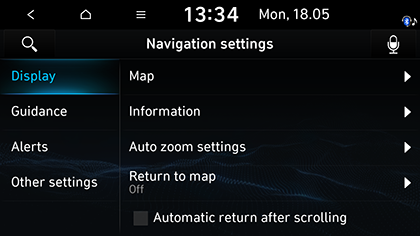
- Select the desired items.
- [Map]
- [Colour scheme]: Sets the map colour.
- [Map display]: Sets the map display mode.
- [POI display]: Sets the POI category displayed on the map.
- [Information]
- [Route guide line]: Sets the route guide line colour.
- [Vehicle symbol]: Sets the vehicle symbol style.
- [Display vehicle speed]: Sets to display vehicle speed. In some model of the vehicles, the GPS speed is displayed and it may differ from the cluster speed.
- [Show route details]: Sets the detailed location guide display.
- [Show speed limits]: Sets the speed limits display.
- [Auto zoom settings]: Sets auto scale based on the vehicle speed.
- [Return to map]: Selects the desired time to switch automatically from radio/media to the map screen.
- [Automatic return after scrolling]: Sets the automatic return to the current vehicle position on the map after viewing other locations.
Guidance
This menu is used to change the guidance settings.
- Press [SETUP] > [Navigation] > [Guidance].
|
|
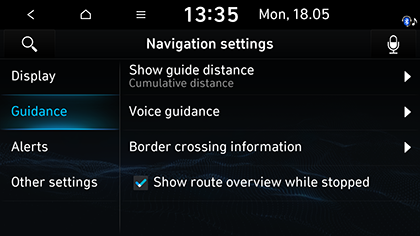
- Select the desired items.
- [Show guide distance]: Sets the type of distance display in the turn-by-turn list.
- [Voice guidance]: Sets the street name pronunciation.
- [Border crossing information]
- [Country information]: Displays country information based on the current location.
- [Border crossing information]: Sets whether to display the border crossing information or not.
- [Show route overview while stopping]: Sets route overview to be displayed while stopping.
Alerts
- Press [SETUP] > [Navigation] > [Alerts].
|
|
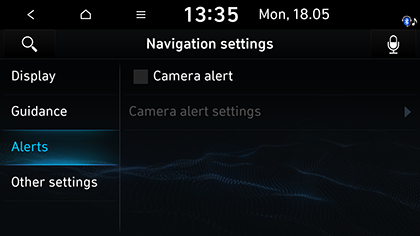
- Select the desired items.
- [Camera alert]: Set the camera alert.
- [Camera alert settings]: Sets the camera alert and the camera alert distance.
Other settings
- Press [SETUP] > [Navigation] > [Other settings].
|
|
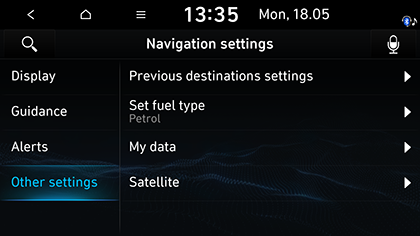
- Select the desired item.
- [Previous destinations settings]
- [Save previous destinations]: Selects to automatically save a location in previous destinations.
- [Save time stamp in previous destinations]: Sets to save the time you used the previous destinations.
- [Show previous destinations on start]: Selects to show previous destinations after navigation starts up.
- [Set fuel type]
- [Display Fuel Price Info on Map]: Sets displays fuel prices of nearby gas stations.
- [Fuel type]: Sets the desired fuel type.
- [My data]
- [Import address book from USB]: This function is used to import the address book in the USB device to the navigation system.
- [Export address book to USB]: This function is used to export the address book in the navigation system to the USB device.
- [Satellite]: Displays the satellite status.
|
,Note |
|