Checking new messages over Bluetooth
After connecting a mobile phone via Bluetooth, you can check the received messages through the system screen converted from the text messages. This option is available when a mobile phone is connected via Bluetooth. You can also send the brief reply message registered in the system.
Checking new messages
When a message is received, the new message notification window appears.
To check the message, press View.
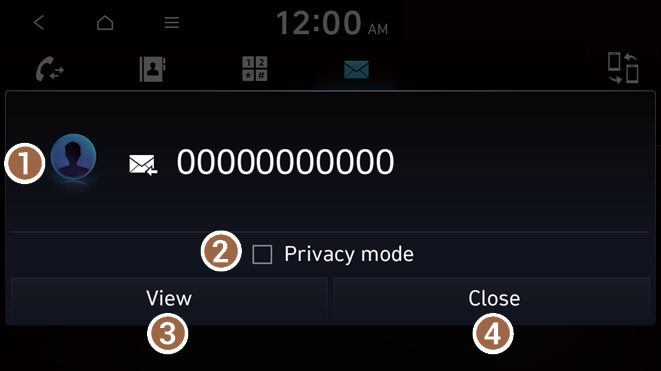
- View caller details.
- Activate the lock mode to protect personal data. The data downloaded from the mobile phone stays hidden while this mode is on.
- Can see the message details.
- Used to close the notification window.
- The message notification window does not appear when the privacy mode is enabled or the message notification is turned off.
Bluetooth message screen

- View the list of received messages.
- Find and connect other Bluetooth devices.
- The list of menu items appears.
- • Display Off: Turns off the screen. To switch the screen back on, press the screen or briefly press the power button.
- • Privacy mode: Activate the lock mode to protect personal data. The data downloaded from the mobile phone stays hidden while this mode is on.
- • Change connection: Find and connect other Bluetooth devices.
- • Device connection settings: Can change the Bluetooth settings.
- • Manual: Displays the QR code that provides access to the online user manual for the system.
Checking new messages from the list
- Perform any of the following methods:
- • On the All menus screen, press Phone.
- • On the steering wheel, press the Call button.
- On the Bluetooth Call screen, press
 .
. - Select a message from the list.
- Check the message.
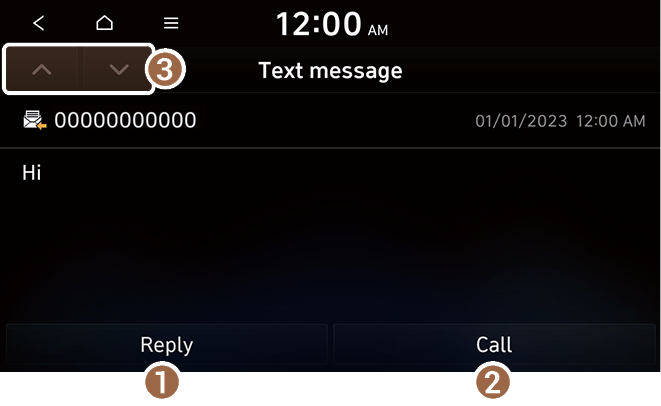
- Used to select a message registered in the system for sending a brief reply message.
- Used to make a call to a message sender.
- Used to move to the previous or next message.
- The auto-reply messaging may not be available depending on the smartphone model.
- To edit or delete a message, park the vehicle at a safe place and access the messaging function on your smartphone. You cannot edit or delete a message from the system.
- When an iPhone is connected to the system, there are some restrictions when receiving messages as follows:
- Only the sender name appears when the sender information is saved.
- When the sender information is not saved, only the phone number appears.
- When the incoming message notification or lock-screen view option is off, messages cannot be received.


