Using the climate control function
You can check and adjust the climate system settings on the screen.
- Depending on vehicle model or specifications, the screen layout and available options may differ.
- For more information about how to use the heater and air conditioner, refer to Owner's Manual of the vehicle.
- When you manipulate the climate control system while using the product, the climate settings appear on the upper part of the screen (if equipped).
- Perform any of the following methods:
- • Press the button on the climate control system.
- • On the All menus screen, press Climate.
- Select and then change the settings.
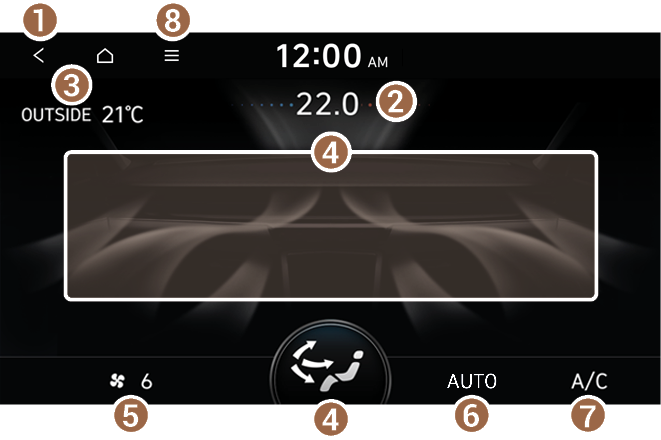

- Returns to the previous step.
- Shows the current set temperature.
- Shows the outside temperature of the vehicle.
- Shows the current airflow direction.
- Shows the current fan speed.
- Shows whether AUTO mode is on or off.
- Shows whether the air conditioner function is on or off.
- The list of menu items appears.
- • Display Off: Turns off the screen. To switch the screen back on, press the screen or briefly press the power button.
- • Manual: Displays the QR code that provides access to the online user manual for the system.
- The temperature of the climate system can be adjusted by 0.5 ℃ increments. When the temperature is set to the lower limit or upper limit, "LOW" or "HIGH" is displayed depending on the vehicle model and specifications.


