Using the climate control system
You can check and adjust the climate system settings on the screen.
Press the button on the climate control system.
- For more information about how to use the heater and air conditioner, refer to Owner’s Manual of the vehicle.
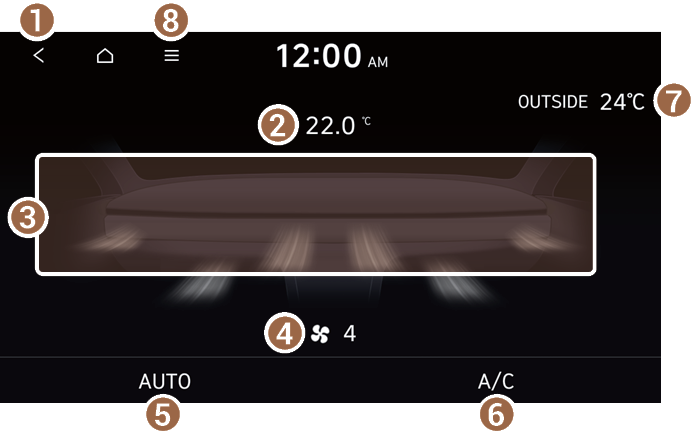
- Returns to the previous step.
- Shows the set temperature for the driver’s seat.
- Shows the current airflow direction.
- Shows the current fan speed.
- Shows whether the automatic temperature control function is on or off.
- Shows whether the A/C is on or off.
- Shows the outside temperature of the vehicle.
- The list of menu items appears.
- • User's Manual on Web (QR Code): Displays the QR code that provides access to the online user manual for the system.
When you manipulate the climate control system while using the product, the climate settings appear on the upper part of the screen.

- The temperature of the climate system can be adjusted by 0.5 ℃ increments. When the temperature is set to the lower limit or upper limit, “LOW” or “HIGH” appears on the screen.
- In Auto mode, the mode turns off in the following situations:
- The fan speed or air direction is changed.
- The air conditioner is turned on or off.
- The Auto Defog function is turned on to ensure driver’s visibility.
- Available settings may differ depending on the vehicle model and specifications.


