Profile
This menu is used to select one of the three profiles on the system and set each profile. Some functions and images may differ from the actual product, according to the model, option and country.
Press [SETUP] > [Profile] or press [ ] on the Home screen.
|
|
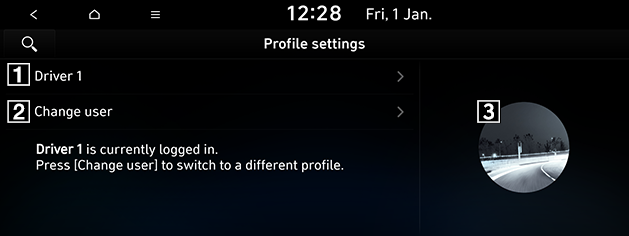
1 Profile name
Displays the profile name applied to the system. Press the profile name itself to change the settings related to the profile or reset them.
- [Name]: You can change the profile name that will be applied to the system.
- [Profile image]: You can select the profile image that will be applied to the system among eleven images.
- [Link mobile devices] (If equipped): You can select the Bluetooth device that will be connected with a profile name automatically after the Bluetooth device paired on the system.
- [Link digital key (Smartphone)] (If equipped): When you pair the smartphone with the profile name on the system at first and put it on the NFC pad of your vehicle later, the system will log in as the profile name paired with the smartphone.
2 Change user
Changes to a different profile. If you change to a different profile, the booting process will start and the safety warning page is displayed.
3 Profile image
Displays the profile image applied on the system.