Listening to DAB (If equipped)/FM
- Press [RADIO] on the head unit.
- Press [AM] to change the band to FM radio, if the radio band is set to AM.
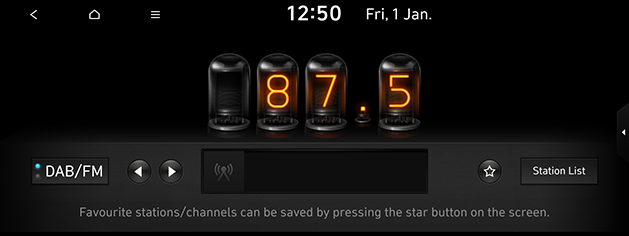
The DAB (If equipped)/FM screen of the most recent listened station is displayed.
|
|
|
,Note |
|
Each time the [RADIO] on the head unit is pressed, the mode is changed in the order DAB (If equipped)/FM > AM > DAB (If equipped)/FM. |
Auto tuning
Press [A SEEK/TRACK D]or [S/W] on the head unit. Plays previous/next available station.
Manual tuning
- On the FM mode, press [
 ] > [Manual tune FM].
|
|
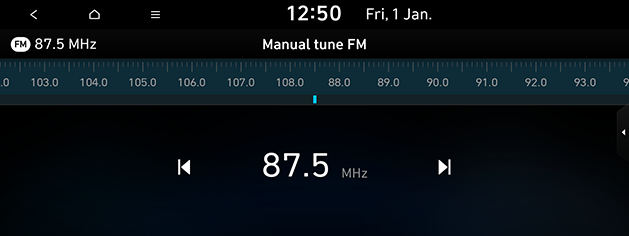
- Drag the station bar to the left/right to find the frequency that you want or press [
 /
/ ].
].
Favourites tuning
Press [S/W] on the steering wheel remote control.
|
,Note |
|
Opening the station list
You can see the station list with superior reception.
- Press [AM] to change the band to FM radio, if the radio band is set to AM.
- Press [Station List].
|
|
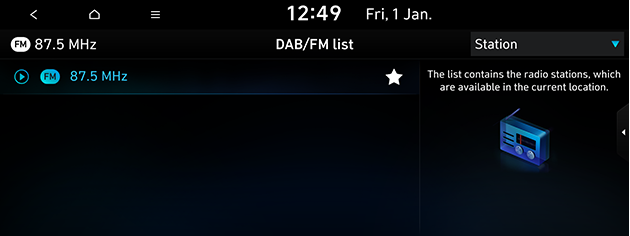
- If you want to save the stations to the [Favourites] menu, press [
 ].
]. - Press [Programme type] or [Station] to arrange the list in station or programme type order.
Saving DAB(If equipped)/FM Favourites
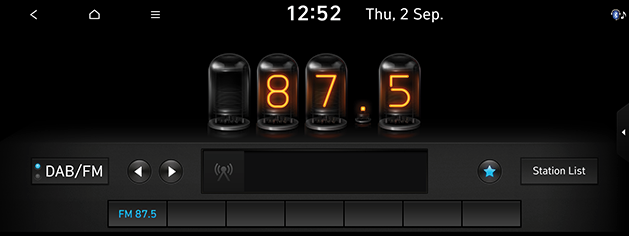
It saves the listening station to the desired favourites list.
- Press [AM] to change the band to FM radio, if the radio band is set to AM.
- Select the frequency to save.
- Press [
 ].
].
|
|
SLS (Slide Show) - DAB only
You can view the slide show image information when image information is available from the broadcasting station in the DAB mode.
- Press [AM] to change the band to FM radio, if the radio band is set to AM.
- Press [
 ].
].
|
,Note |
|
The [ |

Scan
This function scans all stations and plays only stations with good signal strength for 5 seconds each.
Press [ ] > [Scan DAB/FM]/[Scan FM].
Radio noise control
- Press [
 ] > [Radio noise control].
 - For more details, refer to the “Sound” part.
Sound settings
- Press [
 ] > [Sound settings].
 - For more details, refer to the “Sound” part.