Configuring the vehicle settings
You can configure the functions for driving and related environments.

Caution
Make sure you stop the vehicle before changing settings to ensure safety.
- Vehicle settings can be changed only when the vehicle is on.
- Available settings may differ depending on the vehicle model and specifications.
- Depending on the climate control system, some functions may not be supported.
- On the All Menus screen, press Setup ▶ Vehicle.
The vehicle settings screen appears.

Type1

Type2
- The screen may differ depending on the vehicle model and specifications.
- If the vehicle is type 2, it is possible to change the graphic theme to white or black. ▶ See "Graphic Themes (if equipped)."
- Configure the settings required:
- Press
 ▶ Search for Settings or press
  and enter a keyword to search for a setting item.
Driver Assistance (if equipped)
You can set to use various systems that assist the driver for safety.

- The screen may differ depending on the vehicle model and specifications. Refer to the car owner's manual for details of the function.
- If the
 icon is available on the screen, press to switch the view mode for driver assistance functions to image or list view. The functions are shown in image view by default.

Warning
- • Be sure to always check the road conditions while driving. The Driver Assistance system helps you drive safely and conveniently. Relying solely on the function may cause violation of traffic rules and regulations, resulting in an accident.
- • Be sure to control the vehicle by your judgment and keep traffic regulations for safety. When the function is active, drive the vehicle with keeping eyes forward and checking the surroundings.
- • Not all warnings or functions are necessary when they are active, and they do not replace the driver discretion under any circumstances. Stay focused on the road while driving.
Caution
Be sure to always check the vehicle surroundings while driving. The equipped cameras and sensors may not operate properly under all driving conditions.
Smart Cruise Control (if equipped)
Sets the properties of the Smart Cruise Control.
- • Based on Driving Style : Automatically adjusts the Smart Cruise Control system settings based on driving style.
Warning Timing (if equipped)
Sets the timing of the warning.
Warning Methods (if equipped)
Sets the volume and priority of the warning sound for driver assistance. You can configure the haptic warning settings if steering wheel vibration warning is supported.
- • Warning Volume: Sets the volume of the warning sound.
- • Haptic Warning: Sets the intensity of the steering wheel vibration warning (if equipped).
- • Lane Safety Audible Warning Off: Turns off the Lane Safety Audible Warning, even when both warning volume and haptic warning are on (if equipped).
- • Driving Safety Priority: When warning sound is generated while driving, the audio volume decreases to make the sound audible.
- • Parking Safety Priority: When warning sound is generated while parking, the audio volume decreases to make the sound audible.
Driver Attention Warning (if equipped)
Sets the properties of the Driver Attention Warning system.
- • Leading Vehicle Departure Alert: Sets the properties of the Driver Attention Warning system.
Warning
Be sure to always check the road conditions ahead or surroundings before departure. An accident caused by distracted driving can be prevented.
- • Inattentive Driving Warning: Provides a warning when signs of driver inattentiveness are detected, and recommends a rest if needed.
Forward Safety (if equipped)
Sets the properties of the Forward Safety system.
- • Forward Cross-Traffic Safety: Provides a warning and emergency braking when a risk of forward crosstraffic collision is detected.
- • Active Assist: Provides a warning and vehicle control when a risk of forward collision is detected.
Warning
This function is only a supplemental function and it is not intended to, nor does it replace the need for extreme care and attention of the driver. The sensing range and objects detectable by the sensors are limited. Pay attention to the road conditions at all times.
- • Warning Only: Provides a warning when a risk of forward collision is detected.
- • Off: Disables the Forward Safety functions.
Lane Safety (if equipped)
Sets the properties of the Lane Safety system.
- • Assist: Automatically assists with steering to help prevent the vehicle from leaving the lane.
Warning
Lane Keeping Assist is a supplementary function for safe driving and does not replace driving. It is the responsibility of the driver to always be aware of the surroundings and steer the vehicle.
Caution
When the lanes are not recognized well by front view camera, always check the surroundings because the Lane Keeping Assist may not work properly.
- • Warning Only: Provides a warning when the vehicle leaves the lane without operating the turn signal switch.
- • Off: Disables the Lane Safety functions.
Blind-Spot Safety (if equipped)
Sets the properties of the Blind-Spot Safety system.
- • Blind-Spot View Monitor: Displays the blind-spot view in the cluster when operating the turn signal switch.
- • Safe Exit Assist: Provides a warning and door control when an approaching vehicle is detected in the vehicle's blind spot.
- • Safe Exit Warning: Provides a warning when an approaching vehicle is detected in the vehicle's blind spot.
Caution
- • Safe Exit Assist may not operate properly when a vehicle is coming rapidly two lanes over from your vehicle or a vehicle is approaching at a fast speed from the rear in the lane next to your vehicle.
- • Safe Exit Assist may not operate properly if there is any vehicle or obstacle at the rear area of your vehicle.
- • Safe Exit Assist may be activated later than normal or may not operate properly if a vehicle is approaching fast from the rear of your vehicle.
- • Safe Exit Assist may not operate when the Blind-Spot Safety system malfunctions as follows:
- The warning message of the Blind-Spot Safety system appears on the instrument cluster.
- The sensors of the Blind-Spot Safety system are contaminated or covered.
- The Blind-Spot Safety system does not generate warning or generates a wrong alert.
- • Active Assist: Provides a warning and vehicle control when a risk of blind-spot collision is detected.
Warning
Always be aware of road conditions while driving and be alert for unexpected situations even though Blind-Spot Collision Warning and Blind-Spot Collision-Avoidance Assist are operating.
- • Warning Only: Provides a warning when a risk of blind-spot collision is detected.
- • Off: Disables Blind-Spot Safety function.
Driving Safety (if equipped)
Configure the driving safety system settings.
- • Forward Safety: Provides a warning and vehicle control when a risk of forward collision is detected.
- • Forward Safety Warning Timing: Set the warning activation time for the forward safety system.
- • Forward Cross-Traffic Safety: Provides a warning and emergency braking when a risk of forward cross-traffic collision is detected.
- • Forward/Side Safety: Provides a warning and emergency braking when a risk of forward or side collision is detected.
- • Lane Safety: Automatically assists with steering to help prevent the vehicle from leaving the lane.
- • Blind-Spot View Monitor: Displays the blind-spot view in the cluster when operating the turn signal switch.
- • Blind-Spot Safety: Provides a warning when there is a risk of collision with blind-spot traffic, and controls the vehicle to assist the driver in avoiding collisions when exiting a parking space.
- • Exit Safety: Provides a warning and door control when an approaching vehicle is detected in the vehicle's blind spot.
Parking Safety (if equipped)
Sets the properties of the Parking Safety systems.
- • Camera Settings: Sets the properties of the cameras.
- Display Contents: Specify information that will be displayed on the view screen. Setting items may differ depending on the vehicle model and camera type.
- Display Settings: Adjust the brightness and contrast of the rear view screen. To reset all rear view screen settings, press Reset.
- • Surround View Monitor Auto On: Automatically activates Surround View Monitor when Parking Distance Warning is active.
- • Parking Distance Warning Auto On: Automatically activates Parking Distance Warning when traveling at low speeds.
- • Forward/Side Safety: Provides a warning and emergency steering when a risk of forward or side collision is detected.
- • Rear Safety: Provides a warning and emergency braking when a risk of rear collision is detected while reversing.
- • Off: Disables Parking Safety functions.
- • Rear Cross-Traffic Safety: Provides a warning when a risk of rear cross-traffic collision is detected while reversing. It provides vehicle control to avoid collision, depending on the vehicle model and specifications.
Warning
- • Even though the vehicle is equipped the parking safety system, be sure to check any obstacles in the rear while driving. Relying solely on the driving assist system may cause an accident. Accordingly, be sure to control the vehicle by your judgment.
- • When the sensors cannot detect any obstacles due to the detection limit, it may cause an accident. Be sure to always check the surroundings while parking.
Drive Mode (if equipped)
You can change the vehicle settings for driving conditions.

Type1

Type2
- The screen may differ depending on the vehicle model and specifications.
- If the vehicle is type 2, it is possible to change the graphic theme to white or black. ▶ See "Graphic Themes (if equipped)."
CUSTOM (if equipped)
Sets a personalized CUSTOM drive mode based on user selections.
- • Powertrain: Selects a Powertrain mode.
- ECO: Selects the mode optimized for Eco driving.
- COMFORT or NORMAL: Selects the drive mode optimized for comfortable, everyday driving.
- SPORT: Selects the drive mode optimized for sporty driving.
- • Steering: Selects a steering mode.
- COMFORT or NORMAL: Selects the steering mode optimized for a smooth steering feel.
- SPORT: Selects the steering mode optimized for agile steering with a sporty feel.
- • Suspension: Selects a suspension mode.
- COMFORT: Selects the suspension mode optimized for a smooth, comfortable ride.
- SPORT: Selects the suspension mode optimized for a sporty ride in which you feel the road.
- • AWD: Selects a four-wheel drive mode (if equipped).
- ECO: Selects the mode optimized for Eco driving.
- COMFORT: Selects the drive mode optimized for comfortable, everyday driving.
- SPORT: Selects the drive mode optimized for sporty driving.
- • e-LSD: Selects the Elec. Limited Slip Differential (eLSD) mode (if equipped).
- NORMAL: Optimizes the distribution of power/traction between the left and right wheels of the vehicle for normal, comfortable driving.
- SPORT: Selects the suspension mode optimized for a smooth, comfortable ride.
- • ESC: Selects the Electronic Stability Control (ESC) mode (if equipped).
- NORMAL: Improves handling of the car in adverse conditions.
- SPORT: Improves performance by allowing some oversteer.
Brake Mode (if equipped)
You can set brake pedal feel depending on your driving habits.
Climate Control ECO Mode (if equipped)
You can increase the fuel efficiency by running the air conditioner weakly.
Tow Mode (if equipped)
Set the trailer weight to refer to when entering tow mode.
ECO Vehicle (if equipped)
Set the convenience features available for ECO vehicles.
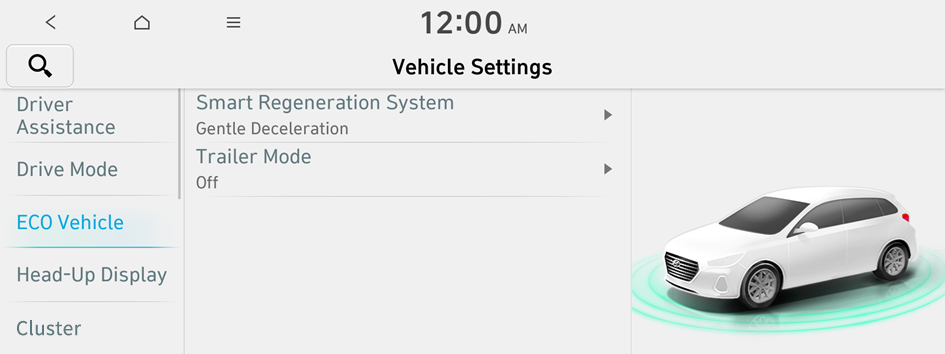
(for IONIQ 5 only)
- Available options may differ depending on the vehicle model and specifications.
Smart Regeneration System (if equipped)
Adjusts the deceleration strength during Smart Regeneration System.
Charging Connector Locking Mode (if equipped)
Configure the lock mode setting for the connected charging cable.
Trailer Mode (if equipped)
Maintain driving performance and estimate the drivable range when a trailer is connected.
Active Sound Design (if equipped)
Turn on or off the engine sound function which generates a virtual engine sound.
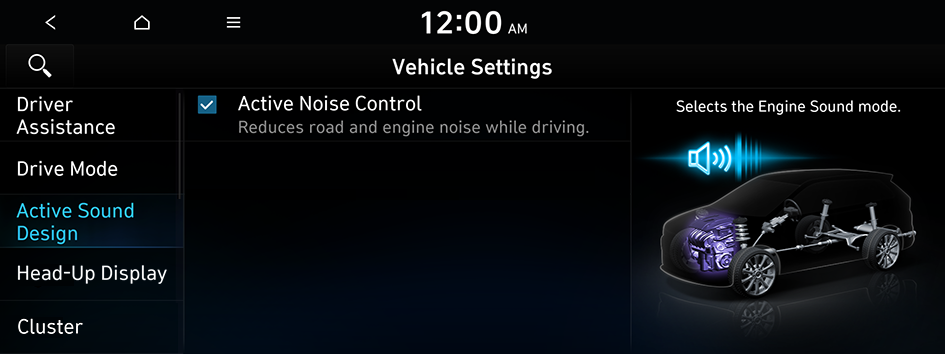
- The screen may differ depending on the vehicle model and specifications.
Active Noise Control (if equipped)
Reduces noise when driving.
Head-Up Display (if equipped)
You can turn on the augmented reality (AR) head-up display function which displays information such as driving speed and road-related information while driving.
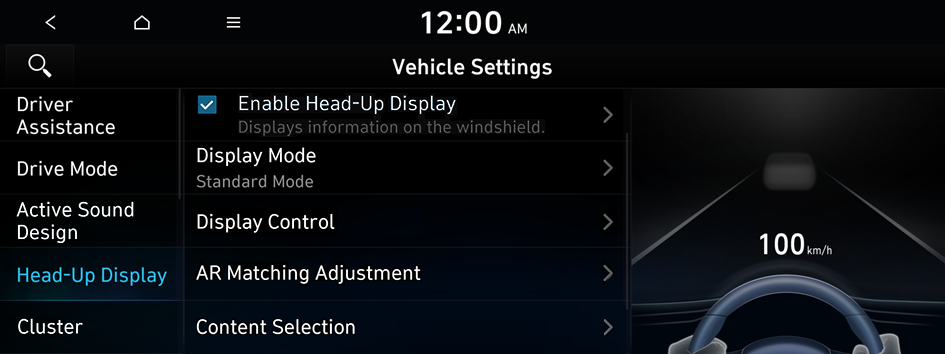
- The screen may differ depending on the vehicle model and specifications.
Enable Head-Up Display (if equipped)
Can determine whether or not to use the head-up display.
Display Mode (if equipped)
Enable/disable the head-up display, and configure the display mode settings.
Display Control (if equipped)
Adjust the height, rotation, and brightness of the head-up display.
AR Matching Adjustment (if equipped)
Adjust settings so that vehicle position on road matches information shown on the head-up display.
Content Selection (if equipped)
Select the items to display on the head-up display.
Cluster (if equipped)
You can set the data to display on the instrument cluster and the volume and type for guiding beep.
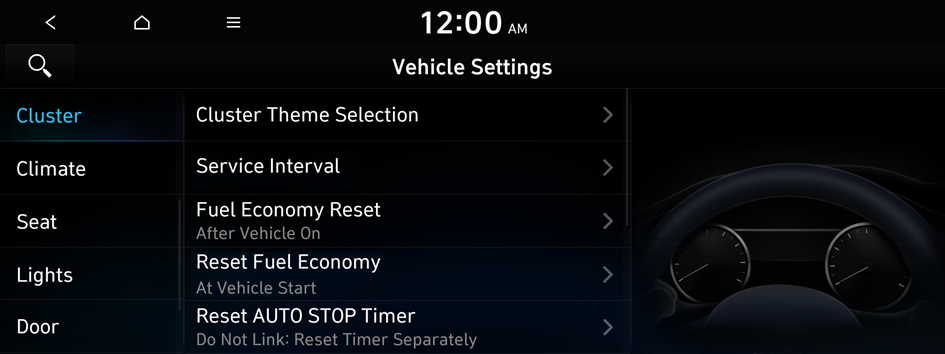
- The screen may differ depending on the vehicle model and specifications.
Cluster Theme Selection (if equipped)
Select and apply a theme to the cluster.
Service Interval (if equipped)
You can set to guide you when to perform the vehicle inspection.
- • Enable Service Interval: Sets the service inspection interval. When it exceeds, the notification is provided.
- • Distance: Sets the driving distance for a service.
- • Duration: Sets the service cycle.
- • Reset: Initializes the settings for distance and duration.
Fuel Economy Reset or EV Economy Reset (if equipped)
You can set to automatically initialize the average fuel economy.
- • After Vehicle On: The average fuel economy is automatically initialize whenever you drive the vehicle.
- • After refueling: The average fuel economy is automatically initialize whenever you refuel the vehicle.
- • After Recharging: The average fuel economy is automatically initialize whenever you charge the vehicle (if equipped).
- • Off: The average fuel economy initialize is unavailable.
Reset Fuel Economy or Reset Avg. EV Economy (if equipped)
Select which average fuel economy to display on the cluster.
- • At vehicle start: Displays the fuel economy after engine restart.
- • After refueling: Displays the fuel economy after refueling.
- • After Charging: Displays the fuel economy after recharging (if equipped).
- • Manually: Displays the accumulated fuel economy.
Reset AUTO STOP Timer (if equipped)
Automatically reset the AUTO STOP Timer when the selected Trip Info display is reset.
- • Reset when 'Current Trip' Info is reset.: Reset when 'Current Trip' Info is reset.
- • Reset when 'Since Refueling' Info is reset.: Reset when 'Since Refueling' Info is reset.
- • Reset when 'Since Last Reset' Info is reset.: Reset when 'Since Last Reset' Info is reset.
- • Do Not Link: Reset Timer Separately: Reset Timer Separately.
Content Selection (if equippd)
You can set the content to display on the instrument cluster.
- • Wiper/Lights Display: When the wiper or light lever operates, the operation mode appears.
- • Traffic Signs: Displays the road information such as speed bumps and speed limits.
- • Blind-Spot View Monitor: Displays the blind spot view on the instrument cluster when the turn signal lamp is operating (if equipped).
- • Icy Road Warning: When the outside temperature drops below 4 ℃ (39 °F), the possibility of road icing appears.
Illumination (if equipped)
You can set the instrument cluster display brightness.
Cluster Voice Guidance Volume (if equipped)
You can adjust the volume of guiding beep.
Welcome Sound (if equipped)
You can set to generate the notification sound when turning on or off the instrument cluster.
Climate (if equipped)
You can configure the operation environment for climate control system.
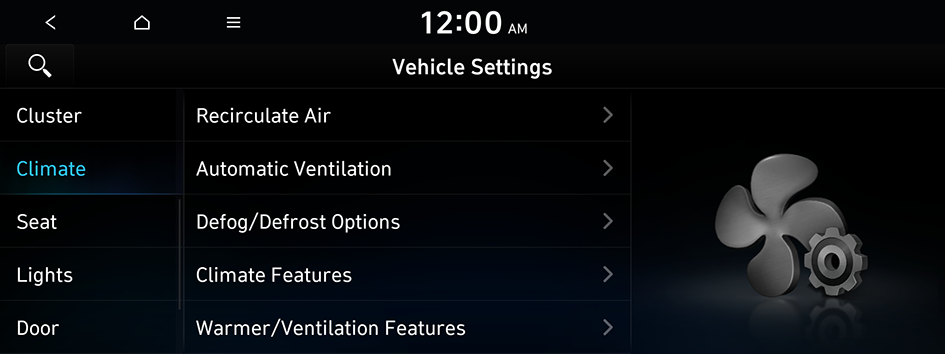
- The screen may differ depending on the vehicle model and specifications.
Recirculate Air (if equipped)
You can set to keep the inside air pleasant by blocking inflow of outside air.
- • Activate upon Washer Fluid Use: Sets to automatically switch to the inside air circulation mode to prevent inflow of washer fluid scent when spraying washer fluid.
- • Activate upon Entering Tunnels: Automatic activation of internal air circulation upon entering a tunnel (if equipped).
Automatic Ventilation (if equipped)
You can set to prevent condensation inside and keep inside air pleasant using this feature.
- • Automatic Dehumidify: Once the inside air circulation mode has been used for a long time, it is switched to the outside air inflow mode to prevent condensation.
- • Smart Ventilation: Sets to automatically switch to the outside air inflow mode to maintain a pleasant indoor environment when the humidity increases in the vehicle with the climate system off (if equipped).
- • Scheduled Ventilation: Automatically ventilates the cabin at the scheduled time. Ventilation occurs while the vehicle is off (if equipped).
Defog/Defrost Options (if equipped)
You can set to enable the defogger to secure driver visibility.
- • Defog/Defrost: When the sensor detects humidity on the windshield and glasses, it enables the outside air inflow mode and air conditioner for defogging and defrosting (if equipped).
- • Auto Defog: When the sensor detects fog on the windshield, the automatic ventilation is run for defogging (if equipped).
Climate Features (if equipped)
You can set or change the settings for the climate system.
- • Air Conditioner Auto-Dry: You can set the climate control system to dry the air conditioner by running when the engine is stopped.
- • Lock Rear Climate Controls: Prevents changes to the climate control system from rear seats (if equipped).
- • Climate Control ECO Mode: Decrease the cooling/heating level to increase the drivable range (if equipped).
Warmer/Ventilation Features (if equipped)
You can set to make the driving environment pleasant by controlling the steering wheel warmer and driver's seat warmer/ventilation.
- • Link to Climate Settings for Auto-Adjustment: Automatically controls the heating wire or ventilation for the driver's seat and steering wheel, in sync with the climate control function.
- Steering Wheel Warmer: Steering Wheel Warmer adjusts automatically based on Climate settings.
- Driver Seat Warmer/Ventilation: Seat Warmer/Ventilation adjusts automatically based on Climate settings.
Seat (if equipped)
You can set to use various features (motions and warmer control for the driver’s seat, rear seat, and steering wheel) that are related to the seats and steering wheel.
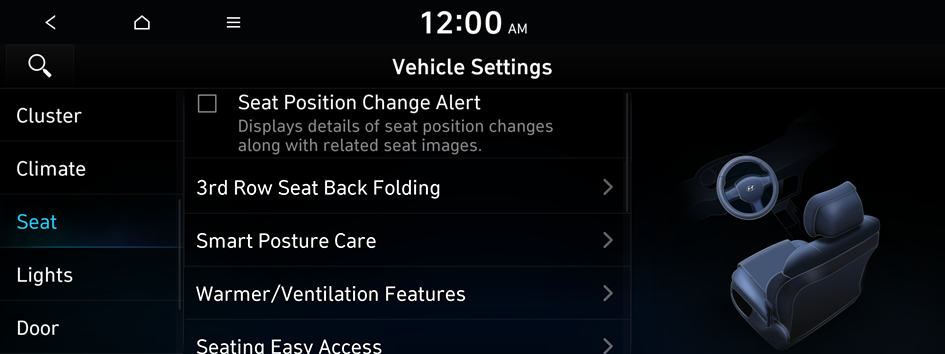
- The screen may differ depending on the vehicle model and specifications.
Seat Position Change Alert (if equipped)
You can set the system to display a notification message along with the seat image on the screen when a seat position is changed.
3rd Row Seat Back Folding (if equipped)
You can fold or unfold the left or right seat back of the 3rd row seat.
- • Fold: Can fold the 3rd row rear seat backs.
- • Unfold: Can unfold the 3rd row rear seat backs.
Smart Posture Care (if equipped)
You can see the recommended driving posture according to your physical data, and the clinical inspection result for your waist.
Warmer/Ventilation Features (if equipped)
You can set to make the driving environment pleasant by controlling the steering wheel warmer and driver’s seat warmer/ventilation.
- • Link to Climate Settings for Auto-Adjustment: Automatically controls the heating wire or ventilation for the driver's seat and steering wheel, in sync with the climate control function.
- Steering Wheel Warmer: Steering Wheel Warmer adjusts automatically based on Climate settings.
- Driver Seat Warmer/Ventilation: Seat Warmer/Ventilation adjusts automatically based on Climate settings.
Seating Easy Access (if equipped)
For convenience upon getting on and off, you can adjust the position of the driver's seat or steering wheel to secure space inside the vehicle.
- • Seat Slide Easy Access: Can set the distance to automatically move the driver's seat when getting on or off.
- • Seat Height Easy Access: Can set to automatically move the driver's seat when getting on or off.
- • Steering Easy Access: The steering wheel moves upward when getting on and off.
Smart Support (if equipped)
Configure the setting so that this feature works when the sport mode or the highway driving assist feature is turned on.
Ergo-Motion Seat (if equipped)
Reduces occupant fatigue and improves ride comfort and safety while driving by ergonomically using seat movements.
Rear Seat Heating Control (if equipped)
You can set to enable the warmer for the rear-left and rear-right seats.
Lumbar Stabilization System while driving (if equipped)
Adjust the seat position to protect your back and ease your back pain while driving.
Lights (if equipped)
You can configure the settings for vehicle lights.
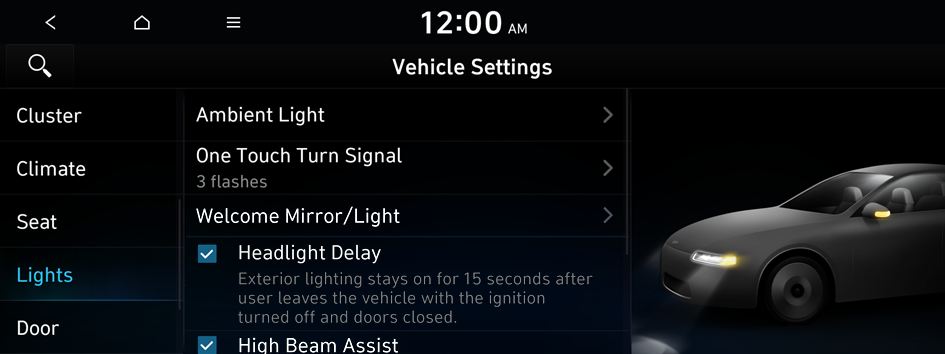
- The screen may differ depending on the vehicle model and specifications.
Ambient Light (if equipped)
You can set the brightness and color of the ambient light.
- To turn off the interior mood lamp, adjust the brightness to 0.
- • Dimmed in Dark: This mode automatically decreases the interior mood lamp brightness when the gear is shifted to a position other than "P" (park) at night (if equipped).
- • Link to Drive Mode: Changes the interior mood lamp color according to the drive mode (if equipped).
One Touch Turn Signal (if equipped)
You can set the number of turn signal lamp flashes when the lamp lever is operated.
Welcome Mirror/Light (if equipped)
You can set the welcoming time on the outside rear view mirrors.
- • Enable on Door Unlock: The welcome feature is enabled by the door unlock event.
- • Enable on Driver Approach: When the driver with the smart key approaches, the welcome feature is enabled.
Headlight Delay (if equipped)
You can set to turn off the taillights and headlights in 15 seconds after turning off the vehicle to ensure visibility.
High Beam Assist (if equipped)
You can set to automatically control the high beam when an oncoming vehicle is approaching to decrease the high beam glare.
Interior Lights Always On (if equipped)
Illuminates the interior buttons and switches at all times.
Door (if equipped)
You can configure the operation environment for the trunk and doors.
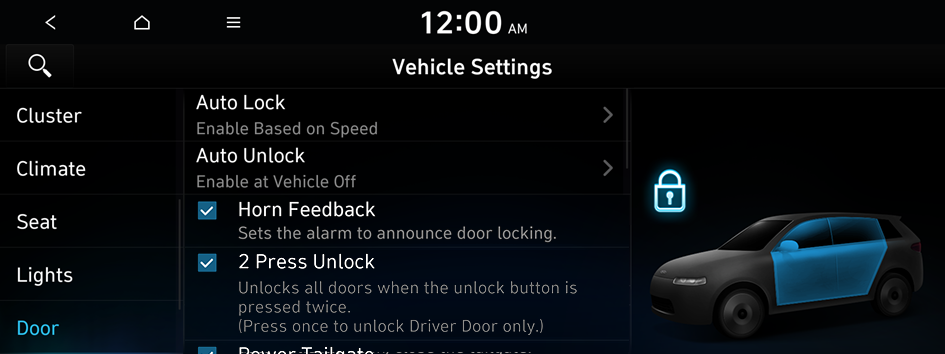
- The screen may differ depending on the vehicle model and specifications.
Auto Lock (if equipped)
You can set the time to automatically lock all doors.
Auto Unlock (if equipped)
You can set the time to automatically unlock all doors.
Horn Feedback (if equipped)
You can set to generate guiding beep when all doors are locked.
2 Press Unlock (if equipped)
You can set to unlock all doors by pressing the door unlock button twice.
- When you press the door unlock button once, only the driver's seat door is unlocked.
Power Trunk or Power Tailgate (if equipped)
Open or close the trunk (tailgate) automatically using the power trunk (tailgate) button.
- The displayed name may differ depending on the vehicle model and specifications.
Power Trunk Opening Speed or Power Tailgate Opening Speed (if equipped)
Set the opening speed for the power trunk (tailgate).
- The displayed name may differ depending on the vehicle model and specifications.
Power Trunk Opening Height or Power Tailgate Opening Height (if equipped)
Set the opening height for the power trunk (tailgate).
- The displayed name may differ depending on the vehicle model and specifications.
Smart Trunk or Smart Tailgate (if equipped)
Opens the trunk (tailgate) automatically when approaching the trunk (tailgate) with the smart key.
- The displayed name may differ depending on the vehicle model and specifications.
Remote Window Control (if equipped)
Turns on the remote window control function.
Digital Key (if equipped)
You can register or delete a digital key and then see the information of the registered digital key.
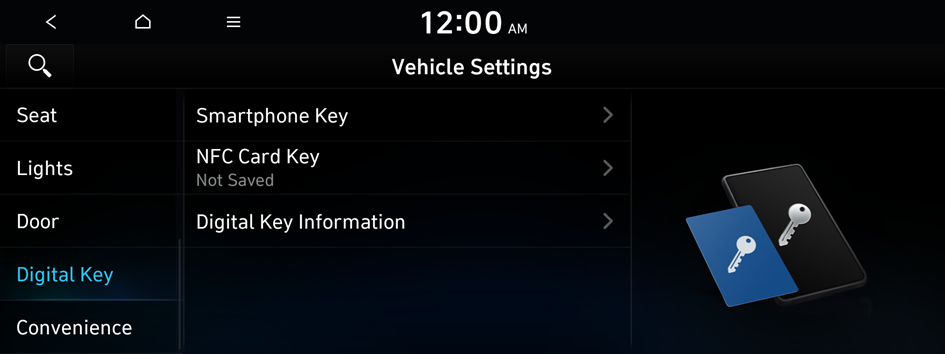
- The screen may differ depending on the vehicle model and specifications.
Smartphone Key (if equipped)
You can register or delete a smartphone key.
NFC Card Key (if equipped)
You can register or delete a card key.
Digital Key Information (if equipped)
You can see the serial number of the registered digital key.
Enable Digital Keys (if equipped)
You can set whether or not to use the digital keys.
Convenience (if equipped)
You can configure the features for convenience such as welcome sound and wireless charging.

- The screen may differ depending on the vehicle model and specifications.
Rear Occupant Alert (if equipped)
Movement is detected by the rear-seat sensor after the doors are locked.
Service Interval (if equipped)
You can set to guide you when to perform the vehicle inspection.
- • Enable Service Interval: Sets the service inspection interval. When it exceeds, the notification is provided.
- • Distance: Sets the driving distance for a service.
- • Duration: Sets the service cycle.
- • Reset: Initializes the settings for distance and duration.
Oil Change Reminder (if equipped)
Shows the residual life of the engine oil.
Advanced Anti-Theft (if equipped)
You can set to display an alert when any motion is detected inside the vehicle with the vehicle locked.
Wireless Charging System for Mobile Devices (if equipped)
You can set to charge your smartphone wirelessly.
- This feature is available only in smartphones that can be charged wirelessly.
Auto Rear Wiper (in R) (if equipped)
Activates the rear windshield wiper automatically when the front wiper is On and the gear is in reverse.
Digital Side Mirrors (if equipped)
Configure the digital side mirror view settings.
Cabin Ventilation Alert (if equipped)
You can configure notification settings for checking interior temperature and ventilation status when in your vehicle for more than 1 hour after stopping.
Welcome Mirror/Light (if equipped)
You can set the welcoming time on the outside rear view mirrors.
- • Enable on Door Unlock: The welcome feature is enabled by the door unlock event.
- • Enable on Driver Approach: When the driver with the smart key approaches, the welcome feature is enabled.
Passenger Air Bag (if equipped)
Enable the passenger seat airbag function.
Reset (if equipped)
You can initialize all system settings in the vehicle.
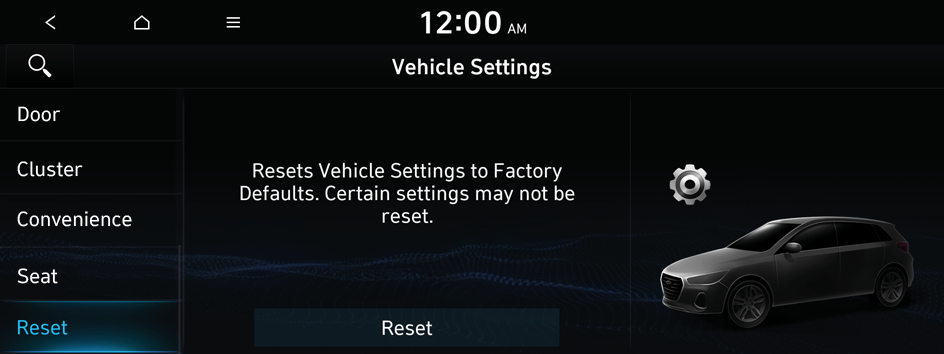
- The required features cannot be initialize.


