Using Voice Recognition System
Guide to using Voice Recognition
Creating an environment inside the car
You can operate the features of AV and Navigation system with voice in Hands-free mode.
For ideal voice recognition performance, please observe the followings.
- Press the voice recognition button (
 ). You will hear a beep when the voice recognition guidance ends. After that, say a voice command.
 - Only the commands in the user's manual will work correctly. Make sure to check the instructions in the manual before using.
- The microphone is located above the driver's head. Therefore, make sure to say voice commands while keeping the correct posture.
- Be careful to prevent loud noise from entering the microphone.
- If the air conditioner is too windy or you hear loud noise from other devices, it may not be recognized properly. In this case, you need to adjust your environment accordingly.
- Create the environment in your vehicle as quiet as possible and speak a little louder to improve voice recognition performance.
- Voice commands should be pronounced naturally and clearly, like a dialogue, without interrupting the words.
- If a one-word name with a single syllable is registered in the phone book, it is not recognized properly. (Example : Tom, June)
- If the phone book contains special symbols, it will not be recognized as voice. (Example: Hong Gil Dong_Friend, Jack!)
- When entering a phone book, words containing alphabets or numbers are recognized only as alphabetic pronunciations and numeric monosyllables. (Example: “EMART123” is recognized only as “E, M, A, R, T, One Hundred Twenty Three”)
- If you change the language displayed on the system to English, the voice recognition feature is not supported.
Getting started with Voice Recognition
Press the button [ ] located on the steering wheel remote control.
|
,Reference |
|
You can set the voice recognition guide sound. For more details, refer to the "Voice Recognition Settings". |
Skipping Voice Recognition Guidance
Press the [ ] button located on the steering wheel remote control briefly again during the voice recognition guidance.
Ending Voice Recognition
Press and hold the [ ] button located on the steering wheel remote control while voice recognition system is operating.
While the voice recognition system is operating, tap any button other than the [ ] button located on the steering wheel remote control, or press the [End] button on the screen.
Adjusting the guidance volume of the Voice Recognition
During the voice recognition system operation, the volume can be adjusted with the volume button on the front seat control key or the volume button on the steering wheel remote control.
Basic Operation
- Press the button [
 ] located on the steering wheel remote control.
|
|
|
,Reference |
|
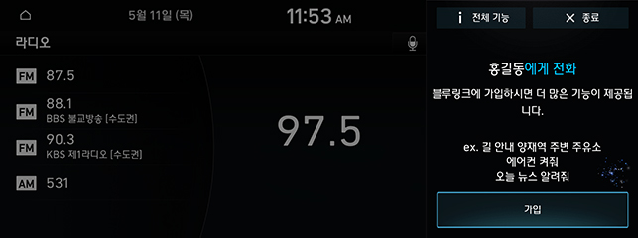
While the system voice guidance is operating, press [ The voice recognition guidance will be terminated immediately and together with beep sound, you can enter voice commands. |

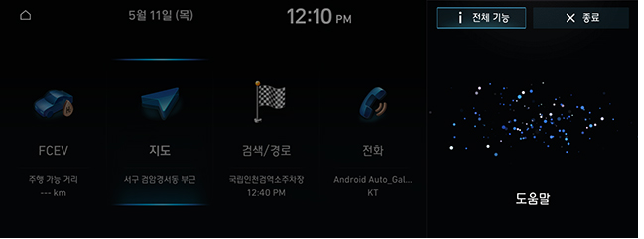
- If you hear a beep sound after voice guidance, together with beep sound, please say the Voice Commands that you want (Ex: 도움말)
|
|
- Says the voice commands that you want. (Ex: 전화)
|
|
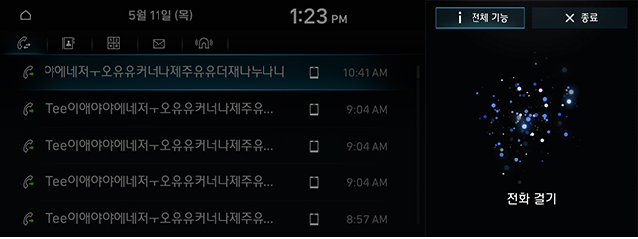
- The input command is fed back to the Screen and System Voice. To return to the previous screen, enter the "이전 화면 (Previous Screen)" command.
- The list can be provided with more than one page and can be moved to the desired page by using commands such as "이전 페이지 (Previous Page)" and "다음 페이지(Next Page)".
- If you do not know much about the commands, you can see the detailed command list by using the "도움말 (Help)" command.
You can check more about Voice Recognition if you press [전체 기능].
Previous Destinations
You set one of your previous destinations as your destination.
- Press the button [
 ] located on the Steering Wheel Remote Control.
 - If you hear a beep sound after voice guidance, say “목적지 (Previous Destination)”
|
|
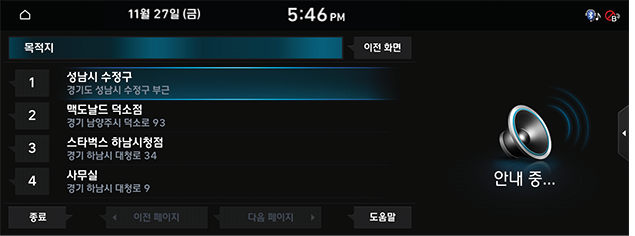
- Say the list of the places you want to go. (ex: 목록 이 (List))
|
|
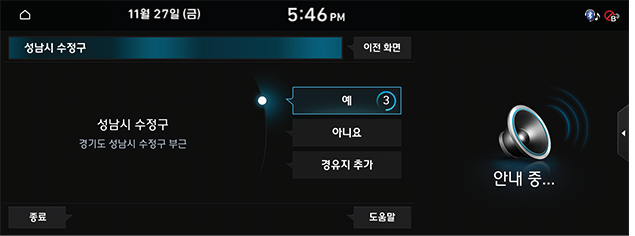
- Say [예 (Yes)]
|
|
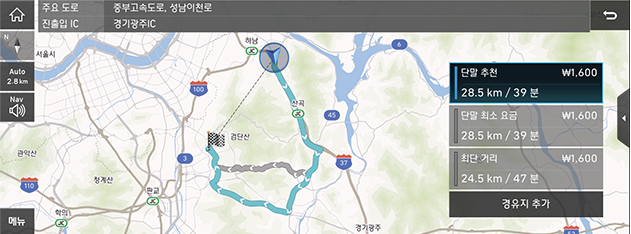
Home
Home, which is already registered, is set as a destination.
- Press the button [
 ] located on the Steering Wheel Remote Control.
 - If you hear a beep sound after voice guidance, say “우리집 (Home)”
- Home, which is already registered, is set as a destination.
|
,Reference |
|
In case Home is not registered, the message “우리집 설정 후에 사용 가능 합니다. 설정 화면으로 이동할까요?" will appear on the screen. |
Dial
The phone number registered already will be connected.
- Press the button [
 ] located on the Steering Wheel Remote Control.
 - If you hear a beep sound after voice guidance, say “전화 걸기(Dial)”
- Say the name of the person you want to call.
|
|
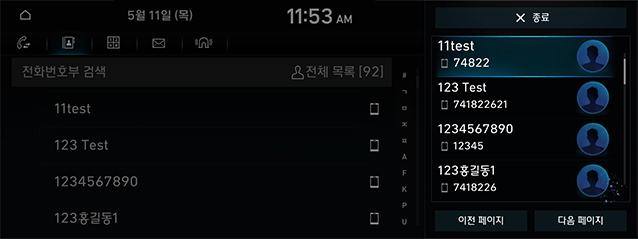
- Dialing the number.
The list of Commands
The Voice Recognition Commands in this system are divided into "common commands" and "general commands”.
- Common Commands (●) : commands that can be used immediately in any situation after the Voice Recognition System has been operated
- General Commands (□) : the available commands, after the Voice Recognition System has been operated, when the media / Navigation / Bluetooth are running or being displayed on the screen
|
,Reference |
|
Phone Commands List
|
Division |
Commands |
Function |
|
● |
Dial |
The downloaded phone book is displayed on the screen, and then you can dial by saying a name. |
|
● |
Calling to (Name) |
You can call (Names) in the downloaded phone book immediately. Example) Calling to “Hong Gil Dong” |
|
● |
Calling to (Name) Mobile Phone |
You can make a call immediately to the number stored in "휴대폰 (Mobile Phone)" of (Name) of downloaded phone book. Example) Calling to “Hong Gil Dong” Mobile Phone |
|
● |
Calling to (Name) Work |
You can make a call immediately to the number stored in "회사 (Work)" of (Name) of downloaded phone book. Example) Calling to “Hong Gil Dong” Work |
|
● |
Calling to (Name) Home |
You can make a call immediately to the number stored in "집 (Home)" of (Name) of downloaded phone book. Example) Calling to “Hong Gil Dong” Home |
|
● |
Calling to (Name) Others |
You can immediately call a number stored separately from " 휴대폰, 집, 사무실 (Mobile Phone, Home, Work)" in (Name) of the downloaded phone book. Example) Calling to “Hong Gil Dong” Others |
Radio Commands List
|
Division |
Commands |
Function |
|
● |
Radio |
The most recent listened Radio among FM1, FM2, and AM is activated. |
|
● |
FM |
The most recent listened Radio among FM1 and FM2 is activated. |
|
● |
FM <Frequency> |
The <Frequency>, that you say, of the most recent listened Radio among FM1 and FM2 is activated. ex) (FM 91.1) 에프엠 구십일 쩜 일 |
|
● |
AM |
Activating AM Radio |
|
● |
AM <Frequency> |
The <Frequency>, that you say, of AM Radio is activated. ex) AM 1008 (에이엠 천 팔) |
|
● |
<Radio Station Name> |
Tell a radio station name to receive the broadcast immediately. Radio station name is reception differs by region. ex) (케이 비 에스 일 라디오) KBS 1 Radio |
Navigation Commands List
- When setting a destination, it searches for the destination in the city or province where the vehicle is currently located. If you want to set a destination for a different city or province, you must search for it after saying the name of that city or province. Searches are sorted by city or province for quick search.
- Some commands, such as "안내 중지/안내 재시작 (Stop Route / Resume Route)", are available with the navigation destination set.
|
Division |
Necessary to Set a Destination |
Commands |
Function |
|
● |
━ |
길 안내 (Destination Settings) |
You set a destination where you want to go. Examples of facility names recognized after this command are as follows. 1. Name of Facility: "서울특별시청 (Seoul Metropolitan City Hall)", 2. Name of Facility (branch name): "NH농협은행 가락남지점(NH Nonghyup Bank Garak South Branch)” 3. Name of Dong + Name of the Facility: "oo동 현대기아부품대리점 ( oo - Dong Hyundai Kia Parts Dealer)", 4. Name of Dong + Name of Apartment: " 가락동 oo아파트 (Garak-dong oo apartment)” |
|
● |
━ |
주변 검색 (POI) |
Searching for nearby facilities where the vehicle is currently located. Searching the desired facility name step by step after this command |
|
● |
━ |
주변 <시설 카테고리> |
Searching for <Facility Name> around the place where the vehicle is currently located. Searching the desired facility name step by step after this command |
|
● |
━ |
지도 보기 (Map) |
Move to the Navigation map of the current location |
|
● |
━ |
최근 사용지점 (Recent POI) |
After displaying the list of saved Previous Destinations, Previous Search Destinations, and Previous Departures, say the list number to set the destination |
|
● |
━ |
최근 목적지 (Previous Destinations) |
After displaying the list of saved Previous Destinations, say the list number to set the destination |
|
● |
━ |
최근 검색지 (Previous Search Destinations) |
After displaying the list of saved Previous Search Destinations, say the list number to set the destination |
|
● |
━ |
최근 출발지 (Previous Departures) |
After displaying the list of saved Previous Departures, say the list number to set the destination |
|
● |
━ |
교통정보 (Traffic Info) |
Move to the Traffic Info Screen |
|
● |
━ |
사고 속보 (Accident Alert) |
Move to the Accident Alert Screen |
|
● |
━ |
우리집 (Home) |
Setting Home as a destination immediately (Home must be stored in the Navigation) |
|
● |
━ |
회사 (Work) |
Setting Work as a destination immediately (Work must be stored in the Navigation) |
|
● |
━ |
내비 음성 안내 켜기 (Turning on Navigation Voice Guidance) |
Navigation Voice Guidance is turned on. |
|
● |
━ |
내비 음성 안내 끄기 (Turning off Navigation Voice Guidance) |
Navigation Voice Guidance is turned off. |
|
● |
○ |
안내 중지/안내 재시작 (Stop Route / Resume Route) |
Route guidance to the currently set destination is stopped or resumed. |
|
● |
○ |
목적지 정보 (Destination Info) |
Voice Guidance for the remaining distance and time to the destination |
|
● |
○ |
경로 재탐색 (Route Recalculation) |
Based on current location, search for the route to the destination. |
|
● |
○ |
전체경로 보기 (Route Overview) |
Move to the map view where you can see the full path to your destination |
Other Commands List
|
Division |
Commands |
Function |
|
● |
도움말 (Help) |
After moveing to the Voice Recognition Help Screen, you can check and execute all available commands. |
|
□ |
목록 1~4 (List 1~4) |
If you cannot select a specific name, such as a recent call list, you can select it by number. It is also possible to recognize the ordinal numbers such as "첫번째 (first)" and "두번째 (second)". |
|
□ |
예 / 아니오 (Yes / No) |
It is used when it is necessary to answer the questions arising in the exceptional situation while Voice Recognition is operating. |
|
□ |
이전 / 다음 페이지 (Previous / Next Page) |
If you see more than 5 items in the list, you can navigate to the list of previous or next pages through Voice. |