Voice Memo
Creating a voice memo
- Press [Voice Memo] on the home screen.
|
|
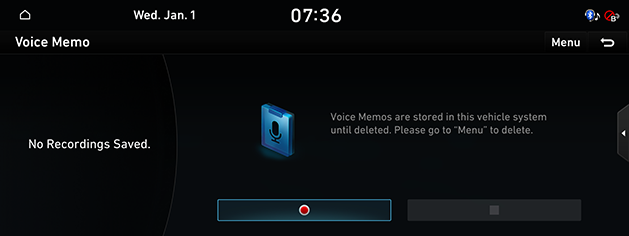
- Press [●] on the voice memo screen.
- Record a voice memo.
|
Location |
Detailed Explanation |
|
Screen |
|
Running voice memo
Pause/Play voice memo
- Select the voice memo you want to play in the voice memo list. The relevant voice memo is played.
|
|
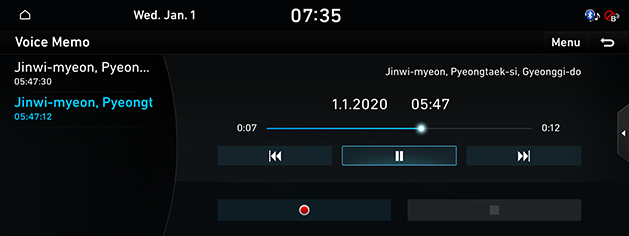
- Press [M] to pause the playback of a voice memo.
- Press [d] to resume the playback while a voice memo is paused.
Play previous/Next voice memo
Plays the previous/next voice memo.
|
Location |
Detailed Explanation |
|
Screen |
Touch [C/V]. |
Forward/Backward search
Rapidly searches the voice memo in play.
|
Location |
Detailed Explanation |
|
Screen |
Touch and hold [C/V], and release it to play the part. |
Deleting voice memo
- Press [Menu] > [Delete] on the voice memo screen.
|
|
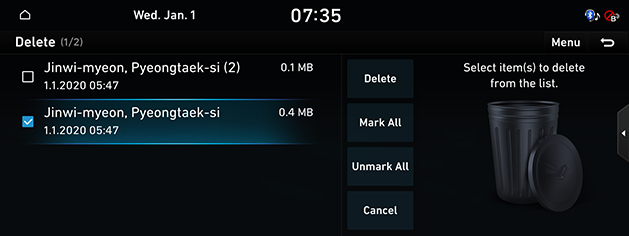
- Select the desired item, press [Delete] > [Yes].
Saving a voice memo to USB
- Connect USB to the USB port.
- Press [Menu] > [Save to USB] on the voice memo screen.
|
|
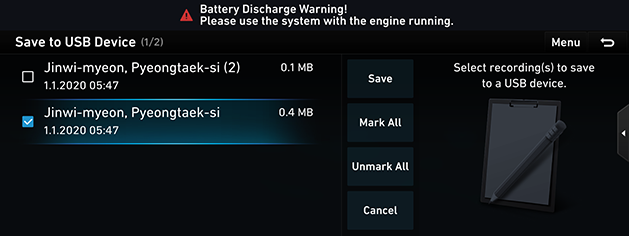
- Select the desired item, press [Save].
|
,Reference |
|