TPEG Traffic Info
Information for convenient driving by delivering the real-time traffic information using terrestrial DMB.
TPEG provides information on the traffic, road, accident alert and news.
|
,Reference |
|
Items without received information may be deactivated. |
Bookmark
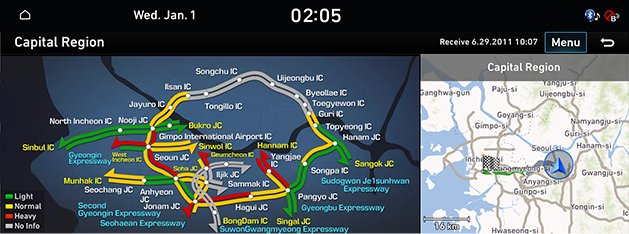
Checks the traffic Info registered in favorites.
- Press [NAV] button on the head unit and then [TPEG] > [Boookmark].
Or press [Navigation Menu] > [TPEG] > [Boookmark] on the home screen.
-

- Press the street name. (ex: “Capotal Region”)
-
|
,Reference |
|
City Street
Checks the traffic condition on major roads nationwide in real-time.
- Press [NAV] button on the head unit and then [TPEG] > [City Street].
Or press [Navigation Menu] > [TPEG] > [City Street] on the home screen.
- Select a road to check.
(ex: Press [Seoul] > [Entire Hangang Area] to check the traffic condition on the entire area of Hangang.)
|
|

|
,Reference |
|
Press [Menu] > [Bookmark] to add to favorites. |
Highway
Checks the traffic conditions of highways and national roads on each region or route.
- Press [NAV] button on the head unit and then [TPEG] > [Highway].
Or press [Navigation Menu] > [TPEG] > [Highway] on the home screen.
- Select a road to check.
(ex: Press [All] to check the traffic condition nationwide.)
|
|

|
,Reference |
|
Press [Menu] > [Bookmark] to add to favorites. |
Search by Street
Checks the traffic condition by entering a road name.
- Press [NAV] button on the head unit and then [TPEG] > [Search by Street].
Or press [Navigation Menu] > [TPEG] > [Search by Street] on the home screen.
- Enter the road name. (ex: “Gangnam daero”)
|
|

- Press [OK].
- Press [Gangnam daero] on the search list.
|
|

|
,Reference |
|
Press [Menu] > [Bookmark] to add to favorites. |
Accident Alert
Enables avoidance of any traffic jam or accident in an area by construction/gathering by specifying the corresponding information and location.
- Press [NAV] button on the head unit and then [TPEG] > [Accident Alert].
Or press [Navigation Menu] > [TPEG] > [Accident Alert] on the home screen.
|
|

- You can select the item you want to check for more information.
If you are on a path, you can use the avoid function.
|
,Reference |
|
News
Provides news on each category.
- Press [NAV] button on the head unit and then [TPEG] > [News].
Or press [Navigation Menu] > [TPEG] > [News] on the home screen.
|
|

- Press an interested category on news category screen.
- Press a new title on category screen.
- Checks the contents of each new on the detail information screen.