Map Screen Composition
|
|
|
|
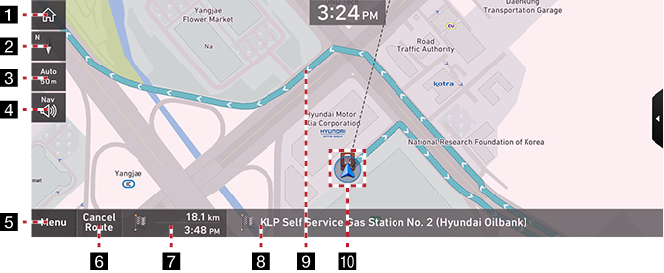
1 Home screen
Moves to home screen.
2 Map View
Sets the view mode of navigation map.
GPS Reception Status Display
- Reception: Specified in color.
- Reception Failure: Specified in grey color.
- GPS reception may not be displayed on any map view mode.
3 Map scale display
Switches to a desired scale.
4 Navigation Volume
Sets the volume of the navigation guide voice and sound effect.
5 Menu
Opens the popup menu.
6 Cancel Route
Stop the navigation to the current set destination.
7 Estimated Arrival Time and Remaining Distance
Displays the remaining distance, the required time and the estimated time to arrive the destination.
8 Current Location and Destination Name Display
Displays the current location and the destination name.
9Route Display
A rough from the current vehicle position to the set destination is displayed.
10 Vehicle Position Icon
Shows the current vehicle position and the direction of vehicle movement.
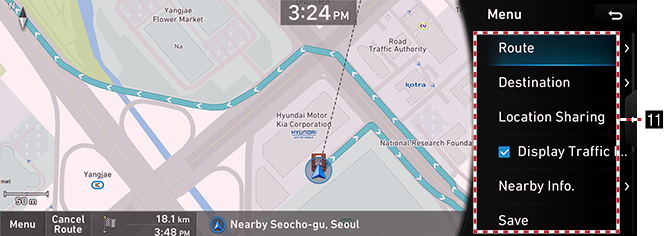
11 Route
Shows route menu.
Destination
Shows various menus to search destination.
Location Sharing
Moves to location sharing menu screen.
Display Traffic Info
Sets whether to display traffic information.
Nearby Info.
Sets surrounding POI categories in the map.
Save
Saves the current location in address book.
settings
Moves to the navigation settings.
Display off
Turns off the screen.
Web Manual
Displays the QR code for the manual of corresponding function.
Split Screen
Displays split screen selection menu.